No single app fits every product-photo job. We read the pricing and feature pages of 7 apps (Photoroom, Canva, Pixelcut, Picsart, Pebblely, Claid, Adobe) and compared them with GenLabs on 29 September 2026. If you only need to cut the background out of one image, in our test Canva and Pixelcut did it in about 5-6 seconds with no login. If you want the lowest-priced paid plan, Photoroom Pro is ฿149 a month (paid monthly). GenLabs starts at ฿599 a month and fits when you want to send a product photo and get Thai-language images and video ready to post, with no prompts to write.
Which AI product photo app fits which job
The table is organised by the job a seller has to do, not as a ranking. Every cell comes from the app's own page, read on 29 September 2026. "Not stated on the pages read" means we could not find it, not that the app cannot do it.
| Job | Apps whose own pages say they do it | Note |
|---|---|---|
| Remove the background from one image, no sign-up | Canva (background remover page), Pixelcut ("no sign-up required") [S-CV, S-PX] | Our test is in H2-3 |
| Remove backgrounds in bulk | Photoroom (Batch), Pixelcut (edit up to 10,000 photos at once), Claid, Picsart (50 images at a time), Canva Pro [S-PR, S-PX, S-CL, S-PS, S-CV] | Photoroom's, Canva's and Claid's (Pro and up) bulk tools are on paid plans |
| Put the product in a new scene without writing anything | Photoroom (Product Staging), Pixelcut (ready-made scenes), Pebblely (40+ themes), GenLabs [S-PR, S-PX, S-PB, S-GL] | Canva, Picsart, Claid and Adobe Firefly work from prompts [S-CV, S-PS, S-CL, S-AD] |
| Generate an image from a description | Canva, Pixelcut, Picsart, Photoroom, Adobe Firefly [S-CV, S-PX, S-PS, S-PR, S-AD] | Pebblely and Claid: text-only generation not stated on the pages read |
| Product video from a photo | Photoroom (Max and Ultra plans), Pixelcut, Canva, Picsart, Claid (paid plans), Adobe Firefly, GenLabs (10-15 second video with an AI presenter who speaks Thai) [S-PR, S-PX, S-CV, S-PS, S-CL, S-AD, S-GL] | Pebblely: not stated on the pages read |
| Schedule posts to social from the same app | Canva Pro (Facebook, Instagram, Twitter, LinkedIn), Adobe Express (TikTok, Instagram, Facebook, X, Pinterest, LinkedIn), GenLabs (TikTok, Instagram, Facebook) [S-CV, S-AD, S-GL] | Photoroom, Pixelcut, Picsart, Pebblely, Claid: not stated on the pages read |
| Thai web pages | Photoroom, Canva, Picsart and Adobe Firefly have Thai /th or th_th pages, Pixelcut partly, GenLabs is Thai by default [S-PR, S-CV, S-PS, S-AD, S-PX, S-GL] | Pebblely and Claid have no Thai pages. Thai inside each app: we could confirm only Adobe Express (Adobe's language list) |
| Prices in baht | Photoroom, Canva, Adobe Firefly, GenLabs [S-PR, S-CV, S-AD, S-GL] | Pixelcut, Picsart, Pebblely and Claid show dollars only |
What each app costs, from its own page
Read on 29 September 2026, in the currency the page shows. "Monthly" is the price when you pay month to month; "yearly" is the per-month price when you pay for a year. Photoroom says its credit amounts vary by country; the figures here are from its page as seen from Thailand.
| App | Plan | Monthly | Yearly (per month) | Currency | Included (per the pricing page) |
|---|---|---|---|---|---|
| Photoroom | Free | 0 | 0 | baht | 25 exports a week, 100 a month, needs an account, personal use only: "You cannot use a free account for commercial purposes" [S-PR] |
| Pro | 149 | 83.50 | baht | 4,500 AI credits, 1,000 exports, AI backgrounds, AI models, no video generator | |
| Max | 399 | 205 | baht | 14,000 AI credits, 3,000 exports, video generator (up to 50 generations) | |
| Canva | Free | 0 | 0 | baht | up to 20 AI uses [S-CV] |
| Pro | 230 | 1,850 a year (about 154 a month, our division) | baht | AI tools, post scheduling, 5 Brand Kits, up to 200 premium AI uses | |
| Pixelcut | Free | 0 | 0 | dollars | limited background removal, export without watermark [S-PX] |
| Pro | 10 | 8 | dollars | 600 AI credits, unlimited background removal per the pricing page, 1,000 batch exports | |
| Picsart | Pro | 15 (struck-through price on the page) | 10.5 | dollars | about 100 Nano Banana Pro generations, advanced background removal, bulk edit 50 images; 7-day trial [S-PS] |
| Pebblely | Lite | 9 | 7.5 | dollars | 30 images a month [S-PB] |
| Basic | 19 | 15 | dollars | 200 images a month, bulk generate | |
| Pro | 39 | 32 | dollars | 500 images a month; no free plan: "We do not offer free trials." | |
| Claid | Free | 0 | 0 | dollars | 50 credits, sign-up needed [S-CL] |
| Essentials | 15 | 9 | dollars | 500 credits, up to 2K | |
| Pro | 49 | 35 | dollars | 2,000 credits, 4K, uploads up to 64 MP | |
| Adobe Firefly | Standard | 380.92 incl. VAT | (not shown on the page) | baht | 2,000 AI credits, up to 20 five-second videos, standard image generation unlimited per the plan page [S-AD] |
| Pro | 761.84 incl. VAT | (not shown on the page) | baht | 4,000 AI credits, includes Adobe Express Premium | |
| Adobe Express | Premium | no baht page reached | The th_th page redirects to English and the price follows the visitor's location: 12.09 euros from a European location and 9.99 dollars from a US location; schedules to 3 accounts per network (free plan: 1) [S-AD] | ||
| GenLabs | Startup | 599 | (no yearly price) | baht | 80 credits, 1 connected social account [S-GL] |
| Pro | 1,990 | baht | 400 credits, unlimited connected social accounts, Relax images (one at a time in a shared queue, no credits) | ||
| Business | 4,990 | baht | 1,600 credits, unlimited connected social accounts, Relax images |
GenLabs is paid by card with monthly renewal, or by PromptPay once for 30 days. Plan credits do not roll over. New sign-ups get a free trial of 10 credits, with no card needed [S-GL].
Per image, each app's units differ (credits, images, exports), so a straight comparison is not fair. This table divides the monthly price by the number of images the page states; the figures are our arithmetic and are the lowest possible when every credit goes to one kind of job:
| App (plan) | What the page states | Per image (our arithmetic) |
|---|---|---|
| Photoroom Pro | AI Backgrounds Basic "2,250 generations" if every credit goes to this job | about ฿0.07 |
| Pebblely Lite / Basic / Pro | 30 / 200 / 500 images a month | $0.30 / $0.095 / $0.078 |
| Claid Essentials / Pro | AI Photoshoot costs 4 credits an image: 125 / 500 images | $0.12 / $0.098 |
| GenLabs Startup / Pro / Business | 1 credit per standard image: 80 / 400 / 1,600 images (if no credits go to video) | about ฿7.5 / ฿5 / ฿3.1 |
To say it plainly: per image, GenLabs Startup (about ฿7.5) costs more than almost every plan in this table, the exception being Pebblely Lite ($0.30 an image), and the same GenLabs credits also make video (a 10-15 second video is 15 credits). What the price does not show is in the next sections.
Background removal: our test
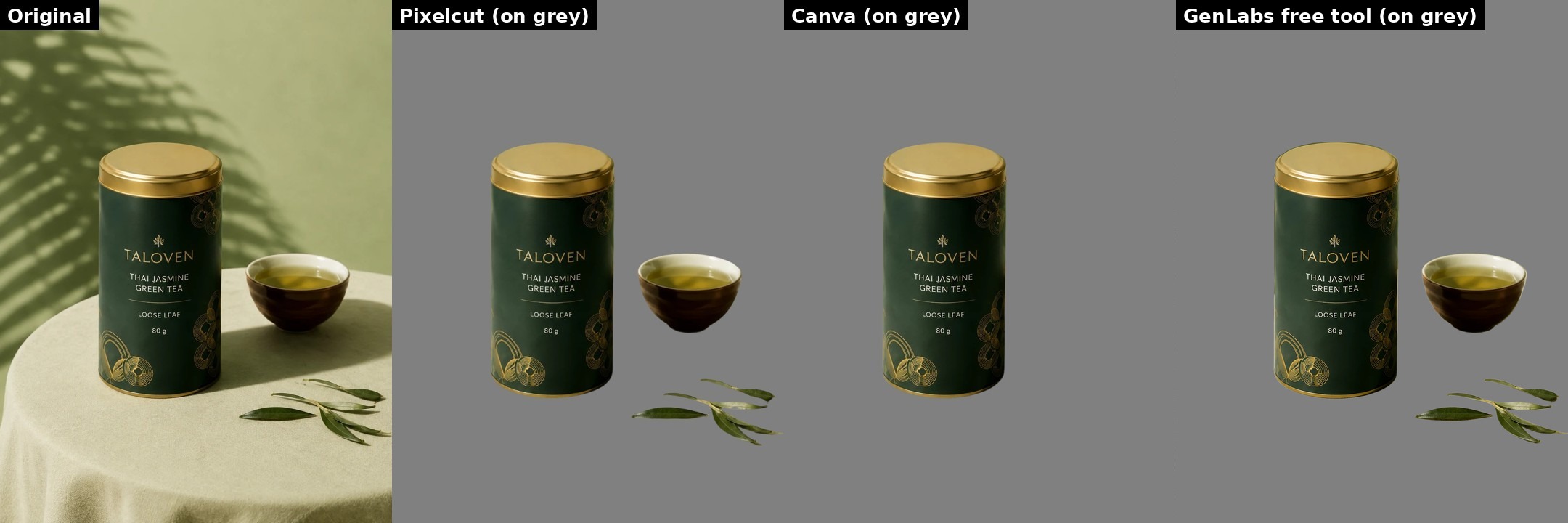
We ran this ourselves on 29 September 2026, 19:59-20:15 UTC (02:59-03:15 on 30 September in Thailand), as an ordinary visitor: no sign-up, no login, no payment. We used two images from our own site gallery (made in GenLabs, fictional brands, not phone photos): a tea tin with a cup and leaves on a cloth-covered table, and sunglasses on glass, a hard case because it sits on clear glass that reflects the sky, and the nose pads are clear plastic. The GenLabs row is a re-run at 23:02 UTC (06:02 on 30 September in Thailand) on the same two images, after an update to the free background remover; Pixelcut and Canva were run between 19:59 and 20:15.
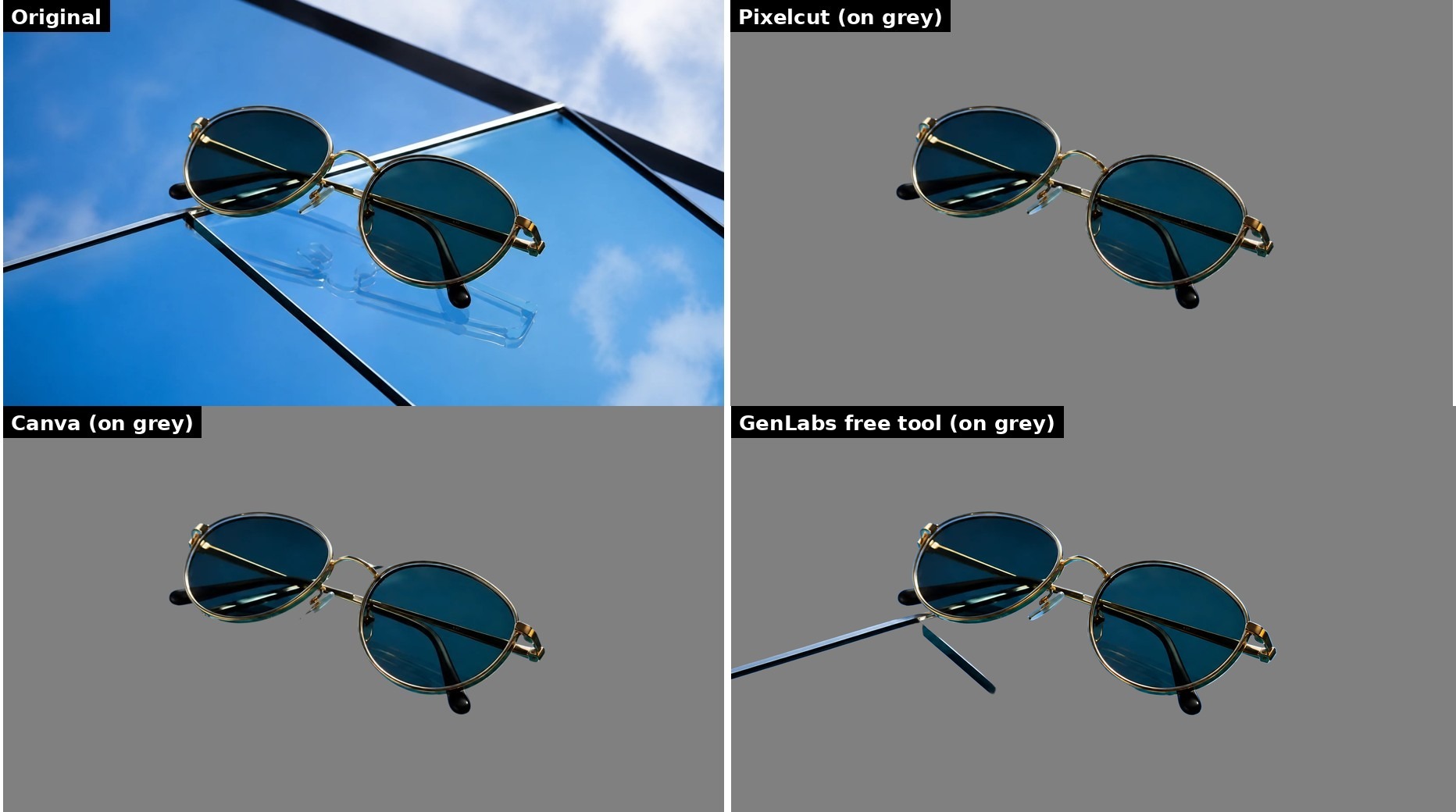
| Tool | Account needed | Time measured | File received | What we saw |
|---|---|---|---|---|
| Photoroom (Thai and English page) | A "confirm you are human" check (Cloudflare) covered the upload before any result | no result in 15-30 seconds | none | We did not click through the check, so there is no result to judge. This says nothing about the quality of Photoroom's cut-out. |
| Pixelcut | No | 5.4 seconds (tea tin, three runs: 5.45, 5.39, 5.66) and 5.2 seconds (sunglasses) | Real transparent PNG, 810x1080 and 1080x607 (the download menu gives a preview size free, and the full size 1086x1448 "free when logged in"). No watermark seen. | Tea tin: tin, cup and leaves all kept; lid rim and cup rim cut cleanly; on white, a pale cream edge 1-2 pixels wide. Sunglasses: lenses solid, glass pane and reflection removed, clear nose pad kept whole. |
| Canva (background remover page) | No login | 6.1 seconds (tea tin) and 5.95 seconds (sunglasses) | Real transparent PNG at full size, 1086x1448 and 1672x941. No watermark seen. | Tea tin: only the tin kept, the cup and leaves were removed; lid rim cut cleanly. Sunglasses: lenses solid, glass pane removed, but the clear nose pad is cut short with a hard diagonal edge and a small dark speck floats below it. |
| GenLabs free background remover (re-run at 23:02 UTC after an update to it) | No | 8.9 seconds (tea tin) and 8.3 seconds (sunglasses), timed differently from the other two tools (Pixelcut and Canva were timed from the web page), so compare roughly | Real transparent PNG at full size, 1086x1448 and 1672x941, the colour of every non-transparent pixel the same as the input; 1.6% and 1.7% of pixels partly see-through | Tea tin: tin, cup and leaves all kept, label text readable; a thin olive line, about 1-2 pixels, along the top edge of the lid. Sunglasses: frame, lenses and clear nose pad kept whole, reflection gone, but two dark edges of the glass sheet stay (one long line coming in from the left edge of the picture, one short line under the frame). |
What it means, as observed: all three tools that returned a result gave a see-through PNG of one image with no sign-up. On the day we tested, Canva and Pixelcut took 5-6 seconds and GenLabs's free tool about 8-9 seconds (re-run after an update to it, timed a different way). They differ on these two images:
- Tea tin: GenLabs and Pixelcut kept the tin, the cup and the leaves; Canva kept only the tin. GenLabs returned the full 1086x1448; Pixelcut's free download was 810x1080. On GenLabs's cut-out there is a thin olive line, about 1-2 pixels, along the top edge of the lid.
- Sunglasses on glass: Pixelcut and Canva removed the glass sheet completely; GenLabs left two dark edges of it, so this is the image where GenLabs is worse. Pixelcut and GenLabs kept the clear nose pad whole; Canva cut it short.
So for a product on glass, Pixelcut or Canva was cleaner in this test. Each tool has something to watch: Pixelcut gives the full size only after login, Canva removed everything but the main subject (the cup and leaves disappeared) and cut the clear nose pad short, and GenLabs left the glass edges and the thin line on the lid.
Limits of this test: two images, made in GenLabs, not your phone photos; mostly one run per image (GenLabs was re-run once per image, about 3 hours after the other two tools); a snapshot of 29 September 2026, not a benchmark. You can repeat it in 5 minutes with your own photo (last section).
New scenes from one photo: do you have to write prompts?
It depends on the app, per each app's own page:
- Nothing to write: Photoroom Product Staging ("Just upload your photo and create beautiful images that drive engagement and sales") [S-PR] and GenLabs (send the product photo and pick a direction; GenLabs writes the prompts, and you can add your own instructions) [S-GL]
- Pick a theme or write your own: Pixelcut ("Pick a Ready-Made Scene or Describe Your Own") [S-PX], Pebblely (40+ templates and custom prompts) [S-PB], Photoroom AI Backgrounds ("Describe any scene or choose from a list of themes"; on the web, prompts and themes cannot be combined) [S-PR]
- Mainly prompts: Canva (the background generator: "describe the background you want with a text prompt", Pro only) [S-CV], Picsart ("replace it with an AI-generated scene using a prompt") [S-PS], Claid ("Write a prompt", "Describe your vision") [S-CL], Adobe Firefly [S-AD]
Not writing prompts is faster and gives you less control of the details. If you want to direct every element yourself, a prompt-based app fits better.
How much Thai, and Thai lettering inside images
Photoroom, Canva, Picsart and Adobe Firefly have Thai web pages; Pixelcut has some Thai headings and plan names; Pebblely and Claid have no Thai pages (Pebblely's /th URL returns 404; Claid's redirects to the English home page) [S-PR, S-CV, S-PS, S-AD, S-PX, S-PB, S-CL]. What these pages do not say is how well an AI draws Thai lettering inside a picture (a bottle label, text on an ad), and we did not test the other apps.
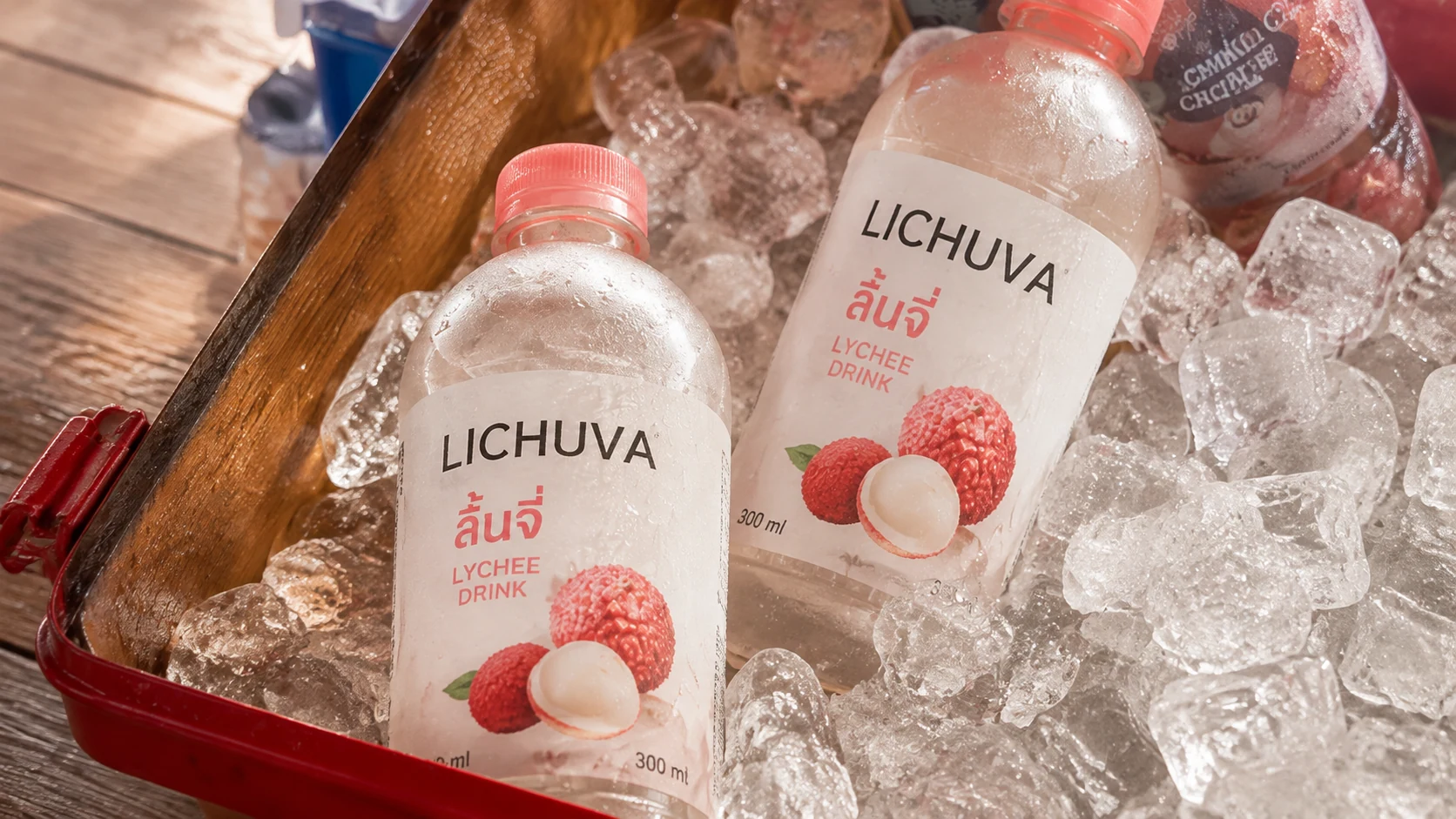
One example of our own: the lychee-drink image on this page comes from our gallery. Its bottle label reads "ลิ้นจี่" beside "LICHUVA LYCHEE DRINK" and "300 ml". We checked the label letter by letter on 29 September 2026; the spelling and tone marks are right.

To check Thai lettering in any app in 3 minutes: put in your product name and one line of text you would really use, then read it letter by letter for the tone marks and the upper and lower vowels: present and not overlapping.
Product video and scheduling posts
Video: almost every app in the table makes video from an image, on different terms. Photoroom's video is on the Max plan (฿399 monthly) and up, and says it will "generate a realistic, ready-to-publish video without writing a prompt" [S-PR]. Claid gives 0 videos on the free plan and uses 60 credits for a 5-second video [S-CL]. Pixelcut has video from an image and talking videos [S-PX]. GenLabs makes 10-15 second videos with an AI presenter who speaks Thai, for 15 credits [S-GL]. The other apps' pages that we read do not mention a Thai-speaking presenter, so we do not compare on it. For video against Google Flow, see Google Flow vs GenLabs.
Scheduling: if all you need is to schedule posts, Adobe Express's free plan connects TikTok, Instagram, Facebook, X, Pinterest and LinkedIn, one account per network ("Currently, you can connect to TikTok (New), Instagram, Facebook, X (Twitter), Pinterest, and LinkedIn for free"), and Premium three per network [S-AD]. Canva Pro schedules to Facebook, Instagram, Twitter and LinkedIn (TikTok is not on the list); one design can go to one platform at a time, and Instagram must be scheduled from a desktop browser [S-CV]. GenLabs includes scheduling to TikTok, Instagram and Facebook in the plan, with analytics, AI captions and a unified inbox; Startup connects 1 account [S-GL].
When does remove.bg close?
If you used remove.bg, its home page says: "remove.bg's background removal is moving to Canva. The standalone website will no longer be available from 1 December 2026 at 9:00am CET." (read 29 September 2026) [S-RB] The alternatives we tested above are Canva, Pixelcut and GenLabs's free background remover.
remove.bg's closing notice and all the options
When GenLabs is not the best choice
- You only need a see-through PNG of one image, and the product sits on a sheet of glass. On our sunglasses image Canva and Pixelcut removed the glass completely in 5-6 seconds with no login; GenLabs's free tool took about 8-9 seconds (timed a different way) and left two dark glass edges in the cut-out.
- You want the lowest monthly plan for a small set of images. Photoroom Pro at ฿149 (monthly) and Canva Pro at ฿230 (monthly) cost less than GenLabs Startup at ฿599, and Photoroom's page states far more generations a month.
- You need to process a lot of images. Photoroom, Pixelcut, Claid and Picsart list bulk processing or an API on their pages. GenLabs makes up to 4 images per run, and its plan page lists no bulk upload or API.
- You want to try with your own photo for free first. Canva and Pixelcut have free plans; GenLabs gives a free trial of 10 credits at sign-up.
- You only want free scheduling to several networks. Adobe Express's free plan connects TikTok, Instagram, Facebook, X, Pinterest and LinkedIn, one account each. GenLabs Startup connects 1 account and starts at ฿599 a month.
- The customer has to see the exact real thing, such as the colour of a garment or food that has to look appetising. A real photograph is still the clearest route. That is our opinion, not a test result. Photographers we read prices for: ice-studio writes "เริ่มต้นเพียง 130 บาท/ภาพ" (starting at 130 baht per image) for white-background images of products up to 15 cm [S-IS], and on Fastwork's "รับถ่ายรูปสินค้า Packshot" category the 40 listings that loaded start from ฿1,500 to ฿60,000, median about ฿2,945 (our calculation) [S-FW].
When GenLabs fits
- You have a real product photo and want post-ready images without writing prompts. Send a phone photo and pick a direction; GenLabs writes the prompts and makes the images, up to 4 per run [S-GL].
- You want a short video where an AI presenter speaks Thai. A 10-15 second video is 15 credits [S-GL].
- You want images, video, captions, scheduling, results and messages in one place [S-GL].
- You work from your phone and want Thai as the default language. GenLabs works in a mobile browser [S-GL].
- You want it fast. Our site says a set of images or a video takes 2 minutes [S-GL].
- You want a full-size transparent PNG of a product photo without signing up. GenLabs's free background remover (3 uses a day) returned a file at the same pixel size as the image we sent (1086x1448 came back 1086x1448, as Canva's did) in about 8-9 seconds, and kept the cup and leaves in the tea-tin image. Its limit in our test: the edges of a glass sheet under the product can stay in the cut-out (H2-3) [S-GL].
Decide in 20 minutes with your own product photo
- Pick one product photo with a readable label (a phone photo works; see shoot a good starting photo with your phone).
- Background removal: put the same photo into Canva and Pixelcut. Note the pixel size, whether the file is truly transparent (place it on grey: if a checkerboard comes with it, it is not), and whether anything that should stay has disappeared.
- New scene: make one in the app you are considering. Note whether you had to write a prompt, how many credits or how much of the quota it used, and how many minutes it took.
- Thai lettering: if the image has a label or Thai text, read it letter by letter.
- Check whether the file is ready for Shopee, Lazada or TikTok Shop straight away; sizes are in product image sizes for every platform.
The one that passes all five for the least time and money on your job is the one to use.
Frequently asked questions
Which AI product photo app is best?
It depends on the job. For removing one background with no login, in our test (29 September 2026) Canva and Pixelcut gave a transparent PNG in about 5-6 seconds. The lowest-priced paid plan we could read is Photoroom Pro at ฿149 a month (paid monthly). If you want to send a product photo and get Thai-language images and video ready to post, without writing prompts, GenLabs starts at ฿599 a month.
How much does Photoroom cost in Thailand?
From Photoroom's Thai pricing page on 29 September 2026: Pro is ฿149 a month (paid monthly) or ฿83.50 a month (paid yearly); Max is ฿399 or ฿205. The free plan is for personal use only, not commercial use.
Can Canva remove backgrounds for free?
Canva's background remover page worked without a login in our test (29 September 2026) and returned a full-size transparent PNG, but it removed everything except the main subject (the cup and tea leaves disappeared in our tea-tin image; GenLabs's free remover and Pixelcut kept them in the same image). Removing backgrounds from many images at once is a Pro feature.
Which apps show prices in baht?
On the pages we read, Photoroom, Canva, Adobe Firefly and GenLabs show baht. Pixelcut, Picsart, Pebblely and Claid show dollars only.
What does GenLabs do that the other apps' pages do not state?
From the pages we read on 29 September 2026, GenLabs states videos with an AI presenter who speaks Thai, and scheduling to TikTok, Instagram and Facebook with a unified inbox in one app. Where GenLabs does less: it costs more per image, makes up to 4 images per run, and in our background-removal test its free remover left two dark glass edges in the sunglasses cut-out that Canva and Pixelcut removed, and took about 8-9 seconds against their 5-6 (timed a different way, so compare roughly).
Can I use images GenLabs makes to sell things?
Section 5 of GenLabs's Terms of Service says: "AI-generated images are licensed to you for commercial and personal use upon generation." (read 29 September 2026: https://genlabs.in.th/en/terms)
Try it with your own product photo. No card needed.
Sources
- S-PR Photoroom: https://www.photoroom.com/th/pricing and https://www.photoroom.com/pricing (THB, VAT included); help https://help.photoroom.com/en/articles/6976012-what-are-photoroom-s-plans and https://help.photoroom.com/en/articles/12523455-free-accounts-and-commercial-use and https://help.photoroom.com/en/articles/6741465-how-to-use-ai-backgrounds; tools https://www.photoroom.com/tools/background-remover , /tools/product-staging , /tools/ai-images , /tools/video-generator/templates , /batch , /api (read 29 September 2026)
- S-CV Canva: https://www.canva.com/th_th/pricing/ ; https://www.canva.com/th_th/features/background-remover/ ; https://www.canva.com/th_th/ai-image-generator/ ; https://www.canva.com/th_th/pro/content-planner/ ; https://www.canva.com/help/content-planner/ ; https://www.canva.com/th_th/ai-image-to-video/ (read 29 September 2026)
- S-PX Pixelcut: https://www.pixelcut.ai/pricing , /th/pricing , /background-remover , /ai-product-photography , /product-showcase , /bulk , /ai-ads , /api (all https://www.pixelcut.ai) (read 29 September 2026)
- S-PS Picsart: https://picsart.com/pricing/ , /th/pricing/ , /background-remover/ , /ai-image-generator/ , /image-to-video/ , /batch-photo-editor/ (read 29 September 2026)
- S-PB Pebblely: https://pebblely.com/pricing , /how-to/ , /faq/ ; https://pebblely.com/th/ returns 404 (read 29 September 2026)
- S-CL Claid: https://claid.ai/pricing , /background-remover , /product/ai-photoshoot , /image-to-video , /apis (read 29 September 2026)
- S-AD Adobe: https://www.adobe.com/th_th/products/firefly/plans.html ; https://www.adobe.com/th_th/products/firefly.html ; https://www.adobe.com/express/pricing ; https://www.adobe.com/express/feature/content-scheduler ; https://helpx.adobe.com/th_th/express/web/get-started/adobe-express-supported-languages.html (read 29 September 2026)
- S-RB remove.bg: https://www.remove.bg/th and https://www.remove.bg/ (closing banner) (read 29 September 2026)
- S-IS ice-studio: https://ice-studio.com/ (photographer price, "เริ่มต้นเพียง 130 บาท/ภาพ") (read 29 September 2026)
- S-FW Fastwork: https://fastwork.co/photography/product (40 listing cards, start prices) (read 29 September 2026)
- S-GL GenLabs: https://genlabs.in.th/pricing (plans, credits, 4 images per run, publishing, Relax); https://genlabs.in.th/en/tools/background-remover (the free remover: 3 free uses a day, no sign-up); Terms of Service section 5 https://genlabs.in.th/terms (read 29 September 2026)