AI photo editor: just type what you want changed
Upload a photo and type what to change in English or Thai, or choose a product-photo preset. Free, 1 edit a day with no sign-up, subject to a shared cap of 4 edits a day. Limits reset at midnight Thailand time.
Drag & drop here, or click to browse
JPG · PNG · WebP up to 10MB
Or type what to change, e.g. remove the box in the back
Free output includes a small GenLabs watermark · See current plans for watermark-free brand content
The free tool we tested: what its 3 buttons do to a product photo
Upload a photo and choose a preset, or type your own instruction. This table explains each button. The test results on this page come from our trial of this tool on 30 September 2026.
| Button in the free tool | What it is set to do |
|---|---|
| Remove people or objects | Removes people and distractions that are not the product or the main subject, then fills the gap to match the background. Adds nothing new |
| White background | Cuts the product out of its background and places it on plain white. The product stays exactly as it is in your photo; it is not redrawn |
| Polish product photo | Brightens and evens out the light, corrects the white balance, removes dust and fingerprints, and sharpens detail. Leaves the background alone |
“White background” does not redraw the product. The other 2 buttons ask the AI to keep the product's shape, colours, logo and label text as they are, and the AI can still change them: see “Will the product still look like the real one after AI editing?”
How much can I edit free in the app?
Sign up free for a free trial of 10 credits, and type up to 5 edits free. The app counts your free edits, such as 1/5. This table shows what is free on the trial and what uses credits.
| What | On the trial, in the GenLabs app |
|---|---|
| Sign-up | Free: name, email, mobile number and a password. No card |
| Trial credits | Free trial, 10 credits, given with the account |
| New images from a product photo | 1 credit an image |
| A typed edit (the “Edit” button) | Free, up to 5. Uses no credits |
| An empty instruction box (you get a new version) or a new ratio | 1 trial credit each time |
| After 5 free edits | The app says “You've used all 5 free edits” and asks you to upgrade to keep editing. On a paid plan, typed edits use no credits. See question 4 |
Do I have to sign up before I edit a photo?
No sign-up is needed for this page: 1 free edit a day, with a shared cap of 4 edits a day. When the quota is full, try after midnight Thailand time or sign up to edit in the app. These other tools also work without signing up.
- Background remover: cut a product out of its background. Free, 3 times a day.
- Photo enhancer: make a blurry photo sharper. AI Enhance is free for 2 photos a day.
- Image resizer: resize to the sizes Shopee, Lazada, Instagram or TikTok use. Free, 10 times a day.
To see what editing in the app costs, see question 4 below.
Will the product still look like the real one after AI editing?
It depends on the button. “White background” cuts the product out and places it on plain white. The product stays exactly as it is in your photo; it is not redrawn. For the other 2 buttons and for an instruction you type, an AI makes a new picture from yours and can change the product's shape, its colour or the text on its label. The GenLabs site asks you to check Thai text and product details before you use any image.
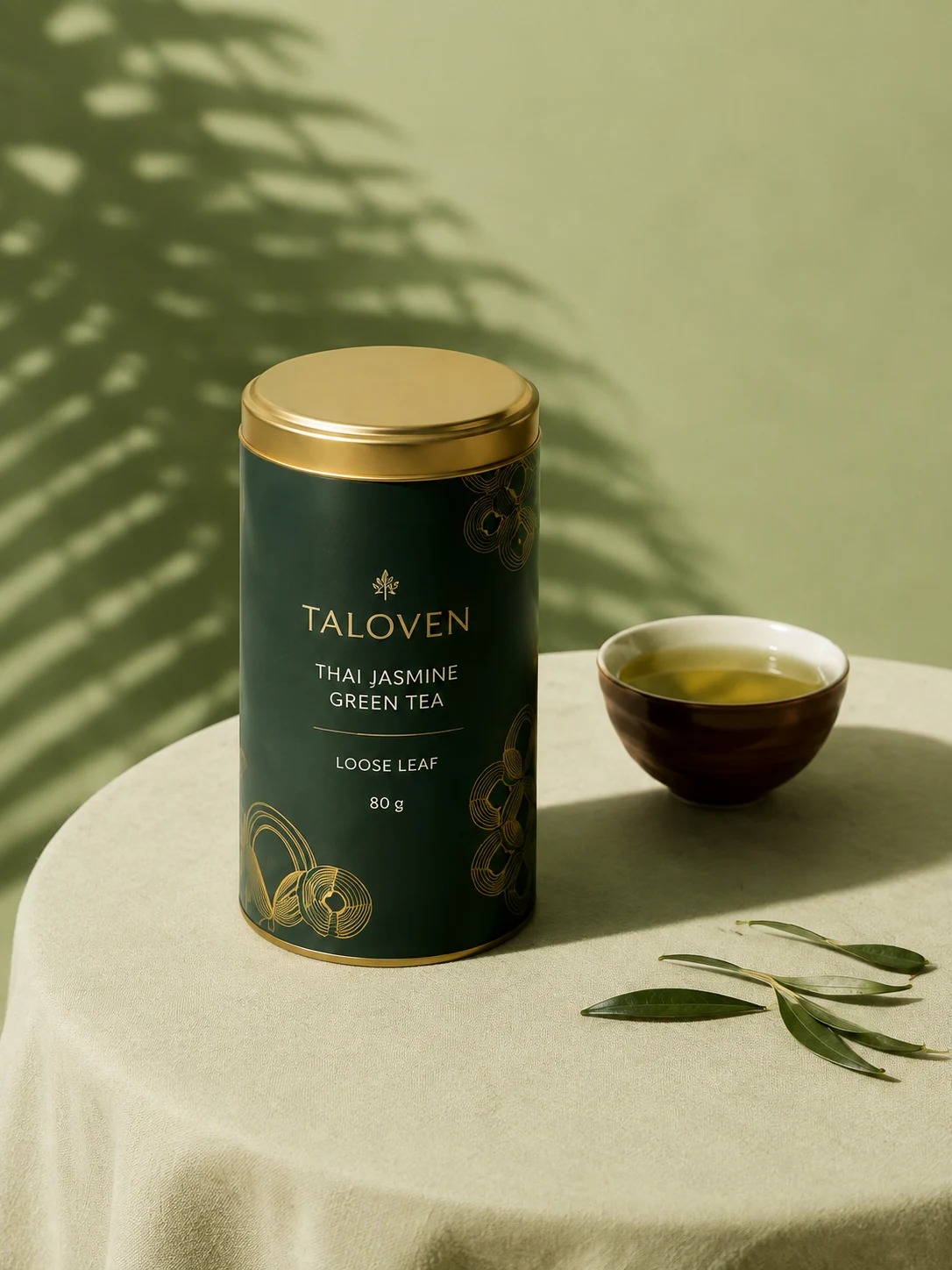
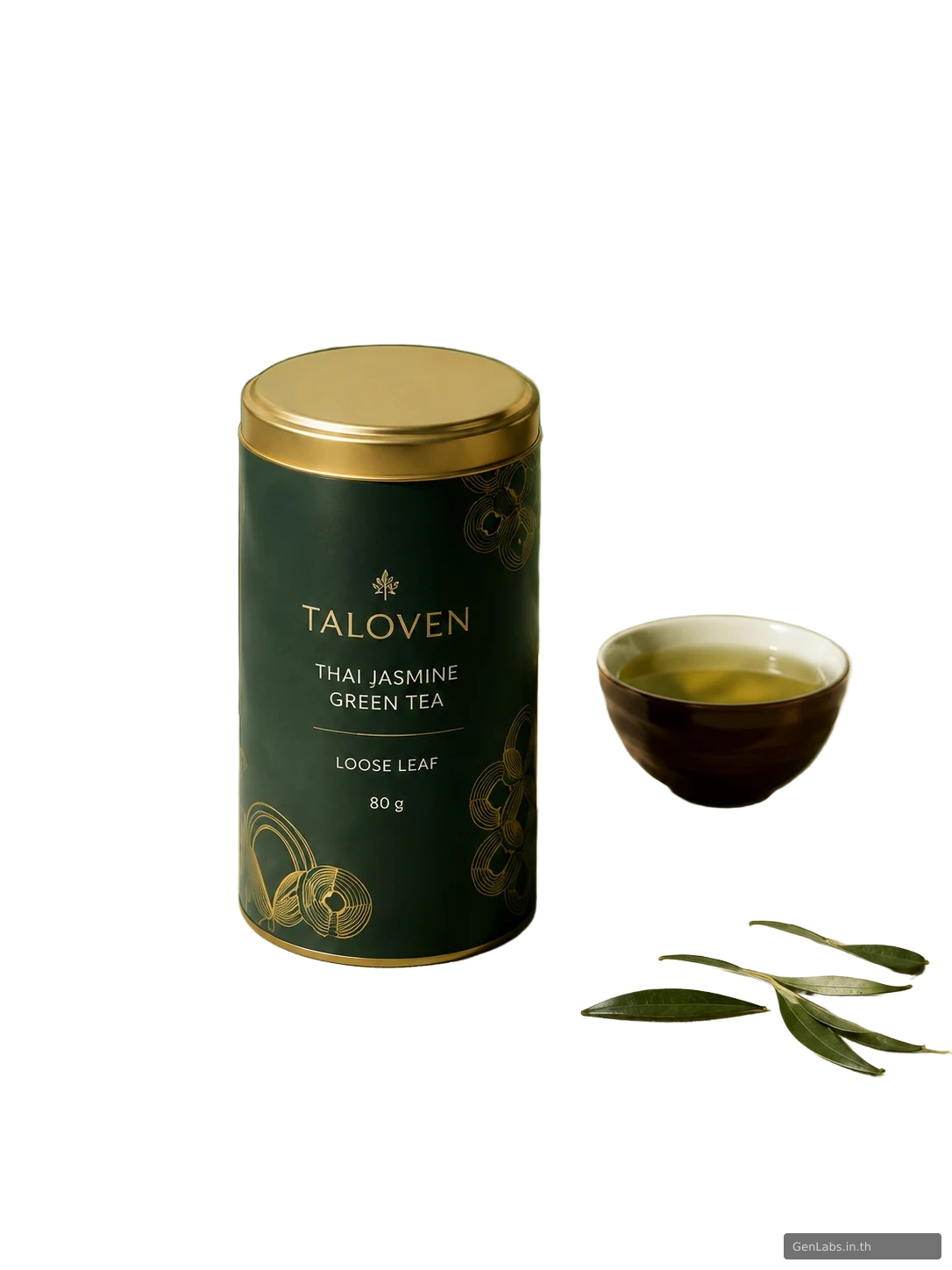
We tapped “White background” on a photo of a tea tin on a table against a green wall. The wall, the table and the leaf shadow turned plain white; the tin, the cup and the sprig of leaves beside them stayed. We compared the result with the original photo pixel by pixel: none of the 284,599 pixels of what it cut out (the tin, the cup and the sprig) differs from the original, so the label text, the small emblem above the brand name and the gold line art are the same as in the original. The 24,825 pixels along the product's edge (1.6% of the picture) are the original colour mixed with white.
We tried only 1 photo, and cutting a product out of its background can go wrong. In our background remover tests the edges of a glass sheet under the product stayed, and where something covers the product only the visible part is cut out. Check these every time you edit a product photo:
- Every letter of the brand name and product name on the label
- The logo and small drawings on the product
- The colour and shape of the product against the real one
- Thai text, including vowels and tone marks
- The edges of the product, and anything that stayed beside it
- Anything that appears in the picture but was not in your original
Edit one photo at a time, or make a whole set of product images at once
Editing changes one existing photo at a time. To get product images, ads and posts as a set, send a product photo from your phone to GenLabs and pick a direction. GenLabs writes the prompts and makes the images: a set in 2 minutes, and you write no prompts yourself. Then you can schedule posts to TikTok, Instagram and Facebook from one place.
Try it on your own product photoFrequently asked questions
Is AI photo editing free, and do I need to sign up?
Yes. You get 1 free edit a day with no sign-up, subject to a shared cap of 4 edits a day. Limits reset at midnight Thailand time. When the quota is full, try the next day or sign up to edit in the GenLabs app.
Can I type the instruction in Thai?
Yes. Upload a photo and type in English or Thai. Say only what should change, such as “change the background to white”. Enter an instruction or choose a preset before starting the edit.
Can AI remove a person from a photo?
Choose “Remove people or objects”, or type what to remove. Results can differ between photos. Check that the filled area matches the background and that the product still looks like your original before using the picture.
How many credits does editing in the GenLabs app use?
Sign up for a free trial of 10 credits. In the app, a typed edit is free, up to 5, during the trial. Changing the proportions, or making a new version without typing an instruction, costs 1 trial credit each time. On the paid plans (from ฿599 a month), edits that come with the plan are free and changing proportions costs no credits. Source: Terms of Service section 4, "Included tools and edits are free" (last updated March 13, 2026, read on 30 September 2026). See all plans at https://genlabs.in.th/en/pricing
Will the product change after AI editing?
It depends on the button. “White background” cuts the product out and places it on plain white, and the product stays exactly as it is in your photo. We tried it on 1 photo of a tea tin: none of the 284,599 pixels of what it cut out (the tin, the cup and the sprig) differs from the original, so the label text and the logo are the same as in the original. For the other buttons and for an instruction you type, an AI makes a new picture from yours and may change the shape, the colour or the text on a label. Check every letter on the label, including Thai text, and the logo before you use the picture.
Can I use an edited photo to sell or to advertise?
Yes. Section 5 of the GenLabs Terms of Service says: "You retain ownership of any images you upload to GenLabs" and "AI-generated images are licensed to you for commercial and personal use upon generation." Read the full terms at https://genlabs.in.th/en/terms (last updated March 13, 2026).