Free image resizer: no sign-up, no upload
To resize an image, pick a JPG, PNG or WebP (up to 10 MB), choose a size, and get the new file in your browser. It is free, 10 times a day, with no sign-up, and the file never leaves your device.
A 1080 × 1080 square is big enough for the minimum at Shopee (500 × 500) and TikTok Shop (600 × 600), and it sits inside Lazada's range (330 × 330 to 5000 × 5000).
This tool sets pixels only. It does not set file size in KB.
Upload
Drag an image here, or click to browse
Drag an image here, or click to browse
Image sizes set by Shopee, Lazada, TikTok Shop, LINE, Facebook and Instagram
A 1:1 product photo at 1080 × 1080 pixels works for all four online shops in table A: it passes the minimum at Shopee and TikTok Shop, sits inside the range Lazada takes, and matches the 1:1 ratio that TikTok Shop and LINE SHOPPING state (Shopee takes 1:1 or 3:4). Posts and ads on Facebook and Instagram use other ratios too. Every number comes from the platform's own page, read on 29 September 2026.
| Platform | Pixel size and ratio | File | Source |
|---|---|---|---|
| Shopee (Thailand) | At least 500 × 500 pixels; ratio 1:1 or 3:4, set by the shop | JPEG, JPG or PNG, up to 2 MB; up to 9 images per product (cover included) | [1] [2] [3] [4] |
| Lazada (Thailand) | 330 × 330 to 5000 × 5000 pixels | jpg or png, up to 3 MB | [5] [6] |
| TikTok Shop (Thailand) | Ratio 1:1; at least 600 × 600 pixels | Up to 10 MB; up to 9 images per product (the product page does not state the file type) | [7] |
| LINE SHOPPING | Ratio 1:1; recommended minimum 640 × 640 pixels | Not stated; up to 7 images | [8] |
| Where | Pixel size and ratio | File | Source |
|---|---|---|---|
| Facebook Feed image ad | Recommended minimum: 1:1 = 1080 × 1080; 4:5 = 1440 × 1800 | JPG or PNG, up to 30 MB | [9] [10] |
| Facebook Page | Profile picture 320 × 320; cover photo loads fastest at 851 × 315 | Cover: a JPG under 100 KB loads fastest | [11] |
| Instagram feed photo | Width 1080 pixels, ratio between 1.91:1 and 3:4 (height 566 to 1440 pixels) | Not stated | [12] |
| Instagram Story (ad) | Recommended 1080 × 1920; minimum 600 × 1067 | .jpg or .png, up to 30 MB | [13] |
| LINE Official Account | Profile photo 640 × 640; rich message 1040 × 1040 (square); rich menu 2500 × 1686, 1200 × 810 or 800 × 540 (large) | JPG, JPEG, PNG; profile up to 3 MB; rich message up to 10 MB; rich menu up to 1 MB | [14] |
Sources (read 29 September 2026; "no date shown" means the page has no date):
- Shopee Seller Education, product listing quality: https://seller.shopee.co.th/edu/article/14587 (20 Jun 2022)
- Shopee, media library: https://seller.shopee.co.th/edu/article/6985 (19 Sep 2024)
- Shopee, 3:4 images: https://seller.shopee.co.th/edu/article/17297 (10 Apr 2024)
- Shopee, listing standards: https://seller.shopee.co.th/edu/article/19781 (23 Sep 2025)
- Lazada Open Platform, Image Upload: https://open.lazada.com/apps/doc/doc?nodeId=30715&docId=120947 (Jul 19, 2024)
- Lazada Seller Center Thailand, image size error: https://sellercenter.lazada.co.th/helpcenter/s/faq/knowledge?language=en-US&m_station=BuyerHelp&questionId=1000147829&hybrid=1&flag=tempWebview&categoryId=1000028123 (2024-11-26)
- TikTok Shop Seller Center Thailand, add and manage products: https://seller-th.tiktok.com/university/essay?knowledge_id=6837816604690177&default_language=th-TH (27 Aug 2026)
- LINE SHOPPING, product setup: https://lineshoppingseller.com/knowledge-hub/basic-set-up/product-setup (11 Aug 2024)
- Meta, minimum image pixels: https://www.facebook.com/business/help/469767027114079 (no date shown)
- Meta Ads Guide, Facebook Feed image ad: https://www.facebook.com/business/ads-guide/update/image/facebook-feed/link-clicks (no date shown)
- Facebook Help, Page profile and cover: https://www.facebook.com/help/125379114252045 (no date shown)
- Instagram Help, photo resolution: https://help.instagram.com/1631821640426723 (no date shown)
- Meta, Instagram Stories ad design: https://www.facebook.com/business/help/2222978001316177 (no date shown)
- LINE for Business, LINE Official Account media sizes: https://lineforbusiness.com/th/helpcenter/line-oa/manual/mediaspecification (no date shown)
- One answer on the same TikTok Shop page mentions "more than 300 × 300 pixels". TikTok Shop's listing guidelines (https://seller-th.tiktok.com/university/essay?knowledge_id=6837810275518210&default_language=th-TH, 16 March 2026) and its add-products page say 600 × 600. We use 600 × 600.
- Shopee Ads recommends product images of at least 1024 × 1024 pixels, square (https://ads.shopee.co.th/learn/faq/73/59, no date shown). A 1080 × 1080 image meets that.
- Meta's two Instagram Story pages differ: the Stories ad design page recommends 1080 × 1920 (the table row above), and the Meta Ads Guide for Instagram Story image ads gives 1440 × 2560 (https://www.facebook.com/business/ads-guide/update/image/instagram-story, no date shown). Both are 9:16. For 1440 × 2560, type it in the custom fields.
Which preset fits where
Use 1:1 Square (1080 × 1080) for product photos in online shops, and Story / Reels (1080 × 1920) for Stories. The other three sizes are the tool's own presets. They are not a rule of any platform in the tables above.
| Tool preset | Use it for (by the numbers in the tables above) |
|---|---|
| 1:1 Square 1080 × 1080 | Product photos on Shopee, Lazada, TikTok Shop, LINE SHOPPING; the minimum Meta recommends for a 1:1 Feed ad |
| Story / Reels 1080 × 1920 | The size Meta recommends for an Instagram Story ad |
| Landscape 1200 × 628 | The tool's own preset, not a requirement of a platform in the tables above |
| YouTube Thumb 1280 × 720 | The tool's own preset (16:9 ratio) |
| Lazada Hero 800 × 800 | Inside Lazada's 330 to 5000 range; "Lazada Hero" is the tool's name, not a Lazada requirement |
| Custom (64 to 4096 pixels) | Type your own width and height, for example 1080 × 1350 (4:5) for an Instagram post, 1440 × 1800 for a 4:5 Facebook ad, 851 × 315 for a Page cover, 1040 × 1040 for a LINE rich message |
Resize an image in 3 steps
- Pick the image: drag it in, or choose a file (on a phone, pick from your Camera Roll). JPG, PNG or WebP, up to 10 MB.
- Choose sizes: tick one or more presets, or type your own width and height. Then choose how to fit the image, the file type (JPG, PNG, WebP) and the quality (90% by default).
- Press "Resize Image", then press "Download" on each size.
A 3:4 photo in a square: add borders, crop or stretch
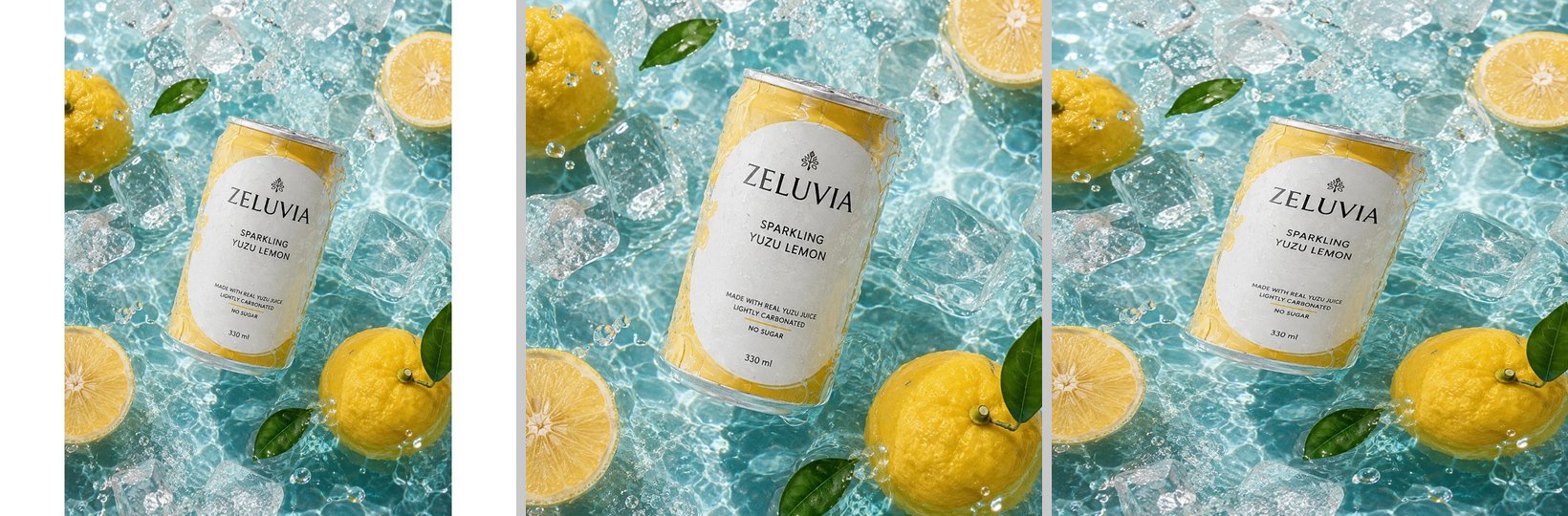
If the photo is not a square already, use "no crop, add borders" (the default) so the whole product stays in the picture. The image will have white bars on two sides. We tried a GenLabs-made image of a drink can, 1086 × 1448 pixels (3:4), at 1080 × 1080:
- No crop, add borders: the whole picture stays. (The 1086-pixel-wide original is 810 pixels wide once it fits the 1080-pixel height.) There are white bars 135 pixels wide on each side (the borders are white for every file type).
- Fill the frame, auto-crop: no bars. It crops from the centre and cuts about 180 pixels from the top and from the bottom. The can stays whole, but the yuzu fruits and leaves at the top and bottom edges are partly cut. If your product is not in the centre, it can be cut.
- Stretch to exact size: no bars, but the picture is distorted: the height is squeezed to about 75%, so the can looks short and wide. Not good for product photos.
If your original is smaller than the size you choose, the tool enlarges it and the picture gets softer. Start from an original that is big enough.
How big is the file: JPG is small, PNG is big
In our test, JPG at 90% quality gave files of 115 to 427 KB. The same 1080 × 1080 image as PNG was 2.1 MB, which is over Shopee's 2 MB limit. If the picture is going to Shopee, pick JPG.
| Original 1086 × 1448 pixels (JPG 665 KB) | File type | File size we got |
|---|---|---|
| 1:1 Square 1080 × 1080 | JPG 90% | 286 KB |
| Story / Reels 1080 × 1920 | JPG 90% | 427 KB |
| Landscape 1200 × 628 | JPG 90% | 115 KB |
| YouTube Thumb 1280 × 720 | JPG 90% | 138 KB |
| Lazada Hero 800 × 800 | JPG 90% | 182 KB |
| Lazada Hero 800 × 800 | JPG 70% | 99 KB |
| Custom 1080 × 1350 | JPG 90% | 387 KB |
| 1:1 Square 1080 × 1080 | WebP 90% | 240 KB |
| 1:1 Square 1080 × 1080 | PNG | 2.1 MB |
KB on this page matches what the tool's screen shows (1 KB = 1,024 bytes). The quality slider goes from 60% to 100%. To make a file smaller still, lower the quality, or use the image compressor to pick a target in KB.
What this tool does not do
This tool resizes in pixels, one image at a time. It does not do the following.
- It does not set file size in KB or MB (use the image compressor).
- It has no inches, centimetres or A4. It takes pixels only, 64 to 4096 on each side.
- It takes one image per run (many sizes at once). There is no batch mode.
- It does not take iPhone HEIC files. It takes JPG, PNG and WebP only (convert to JPG first with the image converter).
- It does not remove backgrounds or fix blur (separate tools do that).
- The free limit is 10 uses a day, counted in your browser, not on our server.
Resized. Next, make the product photo help you sell.
A photo at the right size is still the photo you took. To get product images, ads and posts ready for your shop and page, send one product photo from your phone to GenLabs and pick a direction. GenLabs writes the prompts and makes the images: a set in 2 minutes, and you write no prompts yourself. Then you can schedule posts to TikTok, Instagram and Facebook from the same place.
Try it on your own product photoFAQ
How many pixels and how many MB for Shopee, Lazada and TikTok Shop?
Shopee needs at least 500 × 500 pixels, in JPEG, JPG or PNG, up to 2 MB. Lazada takes 330 × 330 to 5000 × 5000 pixels, in jpg or png, up to 3 MB. TikTok Shop uses a 1:1 ratio, at least 600 × 600 pixels, up to 10 MB. The numbers come from each platform's own page, read on 29 September 2026. The sources are in the tables above.
Will the picture blur or the product get cut when I resize?
The product is not cut if you use "no crop, add borders" (the default), but the picture gets white bars when the ratio does not match. "Fill the frame, auto-crop" crops from the centre, and "stretch to exact size" distorts the product. The picture gets softer only when your original is smaller than the size you pick, because the tool has to enlarge it.
How do I get the file down to 100 KB, 200 KB or under 1 MB?
This tool resizes in pixels. It does not set KB. Use GenLabs' image compressor (https://genlabs.in.th/en/tools/image-compressor) and pick a target of 100KB, 200KB, 500KB or 1MB. If you only need a smaller file, try lowering the quality slider in this tool first. In our test, an 800 × 800 image was 182 KB at 90% quality and 99 KB at 70%.
Can I resize on my phone, and is the file uploaded?
Yes. Open this page in your phone's browser and pick a photo from your Camera Roll. The resizing happens in your browser, and no image file is sent to a server (we watched the network requests while picking the image and pressing Resize, and none carried the image). An iPhone HEIC photo needs to be converted to JPG first with the image converter (https://genlabs.in.th/en/tools/image-converter).
Can I resize many images at once? Does resizing for another channel cost credits in the GenLabs app?
This tool takes one image per run, in many sizes at once. In the GenLabs app, resizing a finished image to another channel's size costs no credits on the Startup, Pro and Business plans. New sign-ups get a free trial with 10 credits; on the trial, one resize or one variation costs 1 credit. See the plans at https://genlabs.in.th/en/pricing