Free tool · Image compressor
Free image compressor: reduce image size to 100KB, 200KB, 500KB or 1MB
Reduce an image to 100KB, 200KB, 500KB or 1MB: pick a size, then upload it. Free, 5 times a day, no sign-up.
Pick a target file size
Drag your image here, or click to browse
JPG · PNG · WebP up to 10MB
What the image looks like at 100KB, 200KB, 500KB and 1MB
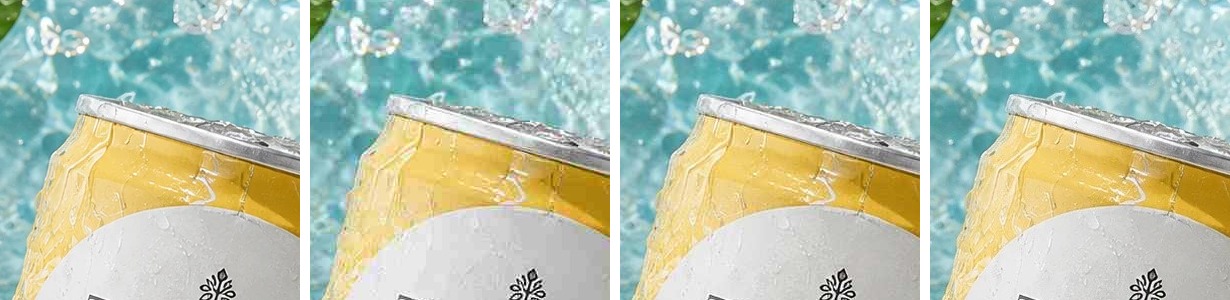
JPG came out at or under the target every time in our test, and the smaller the target, the softer the picture. We tried a GenLabs-made image of a drink can, 1086 × 1448 pixels, saved as a JPG at quality 95 (665 KB), and looked at it at 100% zoom.
| Target you pick | File you get | Smaller than the original | Approximate JPG quality (max 100) | At 100% zoom |
|---|---|---|---|---|
| original | 665 KB | 95 | sharp | |
| 100KB | 98 KB | 85% | 21 | water droplets and surface go visibly soft |
| 200KB | 197 KB | 70% | 56 | slightly soft on the droplets |
| 500KB | 490 KB | 26% | 90 | hard to tell from the original |
| 1MB | 640 KB | 4% | 95 | same quality level as the original (the original was already under 1MB) |
The pixel size does not change in any row (1086 × 1448). The quality level is measured from the resulting file by a file-inspection program, so it is approximate. A file already under the target is still compressed again and comes out a little smaller (the 1MB row). Running the same JPG with the 200KB target again gave the identical file, byte for byte.
How big can a product image be on Shopee, Lazada, TikTok Shop, LINE and Facebook
You do not need to go down to 100KB every time. The file limits Shopee, Lazada and TikTok Shop state are 2 to 10 MB, and this tool's 1MB target sits under all of them. Every number comes from the platform's own page, read on 29 September 2026.
| Where | Stated file limit | Target in this tool that sits under it | Source |
|---|---|---|---|
| Shopee product image | up to 2 MB | 1MB | [1][2] |
| Lazada product image | up to 3 MB | 1MB | [3] |
| TikTok Shop product image | up to 10 MB | 1MB | [4] |
| LINE Official Account profile photo | up to 3 MB | 1MB | [5] |
| LINE Official Account rich message | up to 10 MB | 1MB | [5] |
| LINE Official Account rich menu | up to 1 MB | 500KB (for margin, because the tool's 1MB counts 1,024 KB) | [5] |
| Facebook Feed image ad | up to 30 MB | 1MB | [6] |
| Facebook Page cover | no limit stated but a JPG under 100 KB loads fastest (851 × 315 pixels) | 100KB | [7] |
At 100KB the picture goes visibly softer (the table above). If the cover photo has a lot of detail, reduce the pixel size first with the image resizer (https://genlabs.in.th/en/tools/image-resizer), then pick 100KB.
Sources (read 29 September 2026; "no date shown" means the page has no date):
- Shopee Seller Education, media library: https://seller.shopee.co.th/edu/article/6985 (19 Sep 2024)
- Shopee, product image policy: https://seller.shopee.co.th/edu/article/7049 (13 Nov 2025)
- Lazada Open Platform, Image Upload: https://open.lazada.com/apps/doc/doc?nodeId=30715&docId=120947 (Jul 19, 2024)
- TikTok Shop Seller Center Thailand, add and manage products: https://seller-th.tiktok.com/university/essay?knowledge_id=6837816604690177&default_language=th-TH (27 Aug 2026)
- LINE for Business, LINE Official Account media sizes: https://lineforbusiness.com/th/helpcenter/line-oa/manual/mediaspecification (no date shown)
- Meta Ads Guide, Facebook Feed image ad: https://www.facebook.com/business/ads-guide/update/image/facebook-feed/link-clicks (no date shown)
- Facebook Help, Page profile and cover: https://www.facebook.com/help/125379114252045 (no date shown)
PNG shrinks less and takes longer than JPG
A PNG that is a photo, or has a lot of detail, shrinks less and takes longer than a JPG, and does not go down to 100KB, 200KB or 500KB. The file you get back is always the same type: JPG gives JPG, PNG gives PNG, WebP gives WebP. In our test, the 2.6 MB PNG of the same picture as above came out at 642 KB whether we picked 100KB, 200KB or 500KB (75% smaller), and at 933 KB when we picked 1MB.
| PNG 2.6 MB (1086 × 1448 pixels) | File you get | Time it took |
|---|---|---|
| pick 100KB | 642 KB | 10.5 seconds |
| pick 200KB | 642 KB | 10.6 seconds |
| pick 500KB | 642 KB | 10.5 seconds |
| pick 1MB | 933 KB | 12.0 seconds |
| for comparison, JPG 665 KB with 200KB | 197 KB | under 1 second |
If your PNG is still over the target, convert it to JPG first with the image converter (https://genlabs.in.th/en/tools/image-converter). In our test the 2.6 MB PNG became a 314 KB JPG. Then compress again. Mind transparent backgrounds: a PNG with the background removed gets a white background when converted to JPG (a JPG cannot be transparent). To keep the transparency, keep it a PNG or WebP.
WebP reaches its target: a 374 KB WebP with 200KB picked came out at 191 KB (the tool's screen shows "Saved 49%").
Where does your file go
The file is uploaded to GenLabs' server. This tool does not compress in your browser. When you pick an image, your browser sends the file to genlabs.in.th and gets the compressed file straight back. The server sends the file itself, not a link, and the download is saved from your own browser (we checked what was sent and what came back).
GenLabs does not store the result; it goes straight to your browser.
If you do not want the file to leave your device, use the image resizer (https://genlabs.in.th/en/tools/image-resizer). It runs entirely in your browser and has a quality slider from 60% to 100%, but it cannot set the file size in KB.
Compress a JPG, PNG or WebP in 3 steps
Pick the target size before the image, because compression starts the moment you pick the image.
- Pick a target size: 100KB, 200KB, 500KB or 1MB (200KB is the default).
- Pick the image: drag it in or choose a JPG, PNG or WebP up to 10 MB.
- Check the sizes before and after, then press "Download Compressed Image". The file is named genlabs-compressed with the original extension.
What this tool does not do
- It has no quality slider. You pick one of these 4 targets. If the site you upload to has another limit, such as 150 KB, pick the target under the limit (100KB).
- It does not change the pixel size (use the image resizer).
- It does not take iPhone HEIC files (convert to JPG first with the image converter: https://genlabs.in.th/en/tools/image-converter).
- One file at a time.
- A PNG photo does not reach 100KB, 200KB or 500KB (see section 3).
- It does not promise that no detail is lost. At small targets the picture goes softer.
- The free limit is 5 uses a day, reset every day.
The file is small enough. Next, make the product photo help you sell.
Reducing the file size gets the upload through, but the picture is still the photo you took. To get product images, ads and posts ready for your shop and page, send one product photo from your phone to GenLabs and pick a direction. GenLabs writes the prompts and makes the images: a set in 2 minutes, and you write no prompts yourself. Then you can schedule posts to TikTok, Instagram and Facebook from the same place.
Try it on your own product photoRelated Free Tools
More free image tools from GenLabs