A Shopee product image must be at least 500×500 pixels, up to 2 MB, and a JPEG, JPG or PNG. Lazada takes 330×330 to 5000×5000 pixels, up to 3 MB, as jpg or png, and TikTok Shop needs a 1:1 square of at least 600×600 pixels, up to 10 MB [1] [2] [3] [9] [14] [15].
A 1:1 JPG between 1024×1024 and 5000×5000 pixels and under 2 MB meets the pixel size, ratio and file size that all three state (this is our reading, not a platform rule).
Every platform rule on this page comes from that platform's own page, read on 29 September 2026. The links and the date printed on each page are at the end.
Table of product image sizes for Shopee, Lazada, TikTok Shop, Facebook, Instagram and LINE
Shopee and TikTok Shop use a 1:1 square (Shopee lets a shop choose 3:4). Lazada does not state a ratio for ordinary product images. Facebook and Instagram ads use 4:5 or 9:16. Ratio is width to height (1:1 is as wide as it is high; 4:5 is a quarter taller than it is wide). This table puts the ratio, pixel size, maximum file size and file types of each one side by side. A number in brackets is a source at the end. "At least" is a minimum. "Recommended" is the size the platform recommends.
| Platform | Image | Ratio | Pixel size | Maximum file size | File types | Source |
|---|---|---|---|---|---|---|
| Shopee | Product image (cover and extra images, up to 9 in all) | 1:1 or 3:4 (a shop can turn on 3:4) | At least 500×500; Shopee Ads recommends a square of 1024×1024 or more | 2 MB | JPEG, JPG, PNG | [1] [2] [3] [4] [5] [6] |
| Lazada | Product image | Not stated for ordinary product images | 330×330 to 5000×5000 | 3 MB (3,145,728 bytes) | jpg, png | [9] [10] |
| TikTok Shop | Product image (up to 9) | 1:1 | At least 600×600 | 10 MB | Not stated on the product pages (the storefront page states JPG, JPEG, PNG) | [14] [15] [16] |
| Single-image ad in Feed | 4:5 (1:1 also works) | Recommended 1440×1800 (4:5) or 1080×1080 (1:1); width at least 600 | 30 MB | JPG or PNG (Meta's recommendation) | [19] [20] [24] [25] | |
| Photo post on a Page (not an ad) | Not stated on the Meta pages we read | Not stated on the Meta pages we read | Below 15 MB recommended (Facebook Help Center); up to 10 MB through the API | JPEG, BMP, PNG, GIF, TIFF (PNG best under 1 MB) | [38] [41] [42] | |
| Photo post in the feed (not an ad) | 1.91:1 to 3:4 | Width 1080, height 566 to 1440 | 8 MB (Instagram's API docs; not on the Help Center page we read) | JPEG (Instagram's API docs; not on the Help Center page we read) | [27] [39] [40] | |
| Single-image ad in Feed | 4:5 (accepts 4:5 to 1.91:1) | Recommended 1440×1800; width at least 500 | 30 MB | JPG or PNG | [30] | |
| LINE Official Account | Rich message | 1:1 or custom | 1040×1040 (square); custom width 1040, height 520 to 2080 | 10 MB | JPG, JPEG, PNG | [36] |
| LINE Official Account | Rich menu | Large or small | Large 2500×1686, 1200×810 or 800×540; small 2500×843, 1200×405 or 800×270 | 1 MB | JPG, JPEG, PNG | [36] |
| LINE SHOPPING | Product image (up to 7) | 1:1 | Recommended minimum 640×640 | Not stated on the official page read | Not stated on the official page read | [37] |
Notes under the table:
- Shopee: the media library page says "must not exceed 2MB" [3], and the listing policy page says "should not exceed 2MB" [4]. Both use 2 MB. The 500×500 minimum comes from Shopee's seller pages [1] [2]. The 1024×1024 comes from Shopee Ads, a recommendation for images used in ads [6].
- TikTok Shop: the add-and-manage-products page [15] states 600×600 in its main text, but one FAQ answer on it says "more than 300×300 pixels". The product listing guidelines [14] state 600×600. We recommend 600×600.
- Lazada: the 3 MB limit and the file types come from the Lazada Open Platform, which applies to every Lazada market including Thailand [9]. The Thai Seller Center states the same pixel range [10].
- Facebook Page photo posts and Instagram feed photo posts: on the official pages we read on 29 September 2026, Meta does not state a ratio or pixel size for a photo post on a Facebook Page (Meta Business Help's aspect ratio page and the Ads Guide cover ads only [19] [41]; the Facebook help page on Page photos covers the profile picture and cover photo [26]), and the Instagram Help Center states no file size or file types [27]. Facebook's Help Center page on upload problems recommends JPEG, BMP, PNG, GIF or TIFF files below 15 MB, and a PNG under 1 MB [42]; Meta's Graph API docs set a 10 MB limit [38]. The 8 MB and JPEG for Instagram come from Instagram's API docs [39] [40]. The two API numbers are the rules for publishing a photo through the API, not for an upload made in the app. Instagram's API docs also state a ratio of 4:5 to 1.91:1 and a width of 320 to 1440 pixels, which is a narrower ratio range than the Help Center's [27]. See "Which numbers do the official pages not give?"
What size and style must a Shopee product image be?
A Shopee product image must be at least 500×500 pixels. You can upload up to 9 images per product (the cover included), and each file must be under 2 MB [1] [2] [3].
- Ratio: 1:1 or 3:4. A shop can turn on 3:4 in every product category. Once it is on, the shop page shows only 3:4. Promoted product images on promotion pages, search results and the buyer's daily-picks page still show at 1:1 [5].
- Images used in ads: Shopee Ads recommends a square of at least 1024×1024 pixels, with the product larger than 50% of the image [6].
- Cover image: use a white background if you can. No watermark, logo or text may cover the product. No four-sided frame. The product must fill more than half of the image [1]. The background remover takes the old background off and gives you a transparent PNG.
- Official stores (Shopee Mall): the cover is 1:1 and at least 500×500 pixels. The product takes at least 60% of the image. The brand logo should be no more than 10%. There can be one advertising strip, no more than 30% of the image. A listing needs at least 3 product images [8]. Shopee shows these rules inside an image on its page, and we copied them out.
- Images in the product description: up to 12 (a feature open to some sellers). Each is at least 700 pixels wide, with a ratio from 0.5 to 32, and up to 2 MB. The system shrinks them for you [7].
- You can upload up to 60 files at once in the media library [3].
- Shop banner and decoration images: we found no number in the text of a current official page. See "Which numbers do the official pages not give?".
How big should a Lazada product image be, and how many do you need?
A Lazada product image must be between 330 and 5000 pixels wide and tall, up to 3 MB (3,145,728 bytes), as jpg or png [9] [10].
- How many: one image is enough to list a product, and Lazada recommends at least 3 [12]. Through the API you can pass up to 8 images per image field [11].
- The Product Score in Seller Center counts 3 or more images, images with a white background, and a 3:4 long image (fashion categories only) [12].
- Buyer Promotion Image: the square version is 1:1, at least 330×330 (1000×1000 recommended), on a pure white or transparent background. The long version is 3:4, at least 750×1000 (recommended 750×1000), on white or a real setting. Files are jpg, jpeg or png, up to 3 MB. If the ratio is not 1:1 or 3:4, the image is discarded. No watermark, border or marketing text (announcement dated 2023-03-28) [13].
- The ratio of ordinary product images and the size of shop banners, headers and logos: the official pages we read do not state them. See "Which numbers do the official pages not give?".
What ratio and size does a TikTok Shop product image need?
A TikTok Shop product image must be a 1:1 square of at least 600×600 pixels, up to 10 MB. You can upload up to 9 images per product, and you must pick 1 as the main image [14] [15].
- Main image: a solid background (white recommended); the product covers at least 60% of the frame; the whole product is visible, not cropped to a part; and it shows the front view [14].
- Every image: in colour, not blurred or pixelated, the product not covered, and each image shows a different angle [14].
- Product video: the add-and-manage-products page [15] says up to 20 MB (ratio 1:1, 9:16 or 16:9), but the listing guidelines [14] say up to 5 MB. To be safe, keep the file under 5 MB.
- Storefront (shop decoration): every type takes JPG, JPEG, PNG [16]:
| Type | Ratio | Pixel size | Maximum file size | Number |
|---|---|---|---|---|
| Single image | 16:9 | At least 800 wide | 5M (as the page writes it) | 1 |
| Image slides | 8:10 or 10:8 | Not stated | Not stated | 2-5 |
| Multi-click image | Free | Recommended 1200×675; more than 800 wide | 2 MB | 1 (up to 10 click points) |
| Multiple images | Free | Recommended 800×800 | 2 MB | 2-4 |
| Collection | Not stated | More than 800 wide | 2 MB | 1 |
- Posts and ads on TikTok (not the product page): for 9:16 vertical video, TikTok recommends exporting at 1080×1920 or higher [18]. A carousel ad (several images you swipe through in one ad) takes 2 to 35 images at 1200×628 (horizontal), 640×640 (square) or 720×1280 (vertical), as JPG or PNG, and TikTok suggests files up to 100 KB [17].
Which ratio goes where: 1:1, 3:4, 4:5 or 9:16?
Use 1:1 for product images on TikTok Shop and Shopee (Shopee also allows 3:4). Use 4:5 for single-image ads in the Facebook Feed, as Meta recommends (for the Instagram Feed, the Ads Guide recommends 4:5, while Meta's aspect-ratio best-practice page recommends 1:1). Use 9:16 for Stories and Reels [5] [14] [19] [30] [41].
| Ratio | Where it is used | Source |
|---|---|---|
| 1:1 | TikTok Shop product images; Shopee product images; Lazada's square promotion image; LINE SHOPPING product images; LINE's square rich message; Facebook Feed carousel ads | [5] [13] [14] [23] [36] [37] |
| 3:4 | Shopee product images (a shop can choose it); Lazada's long image (promotion image 750×1000, and the product score for fashion only); the edge of the range Instagram accepts for feed photos (1080×1440) | [5] [12] [13] [27] |
| 4:5 | Single-image ads in the Facebook and Instagram Feed (recommended 1440×1800); Instagram carousel ads with images only (with a video in the set, only 1:1 works); an Instagram post at 4:5 is inside the range Instagram accepts | [19] [27] [30] [34] |
| 9:16 | Image ads in Facebook and Instagram Stories and Reels (recommended 1440×2560; Instagram's Stories ad requirements page recommends 1080×1920); TikTok video | [18] [21] [22] [31] [32] [33] |
| 16:9 | The single image on a TikTok Shop storefront | [16] |
| 1.54:1 | Product cards in a LINE card-based message (image cards use 1.11:1) | [36] |
Maximum image file size each platform accepts
Shopee accepts files up to 2 MB. Lazada accepts up to 3 MB, and TikTok Shop up to 10 MB. Facebook and Instagram ads accept up to 30 MB. LINE accepts 1 MB (rich menu) to 10 MB (rich message) [3] [9] [15] [19] [30] [36]. For ordinary photo posts (not ads), Facebook's Help Center recommends uploading photos below 15 MB [42]. Through the API, a photo published to a Facebook Page must be up to 10 MB [38], and an image published to Instagram up to 8 MB [39]. The Instagram help page we read gives no file size.
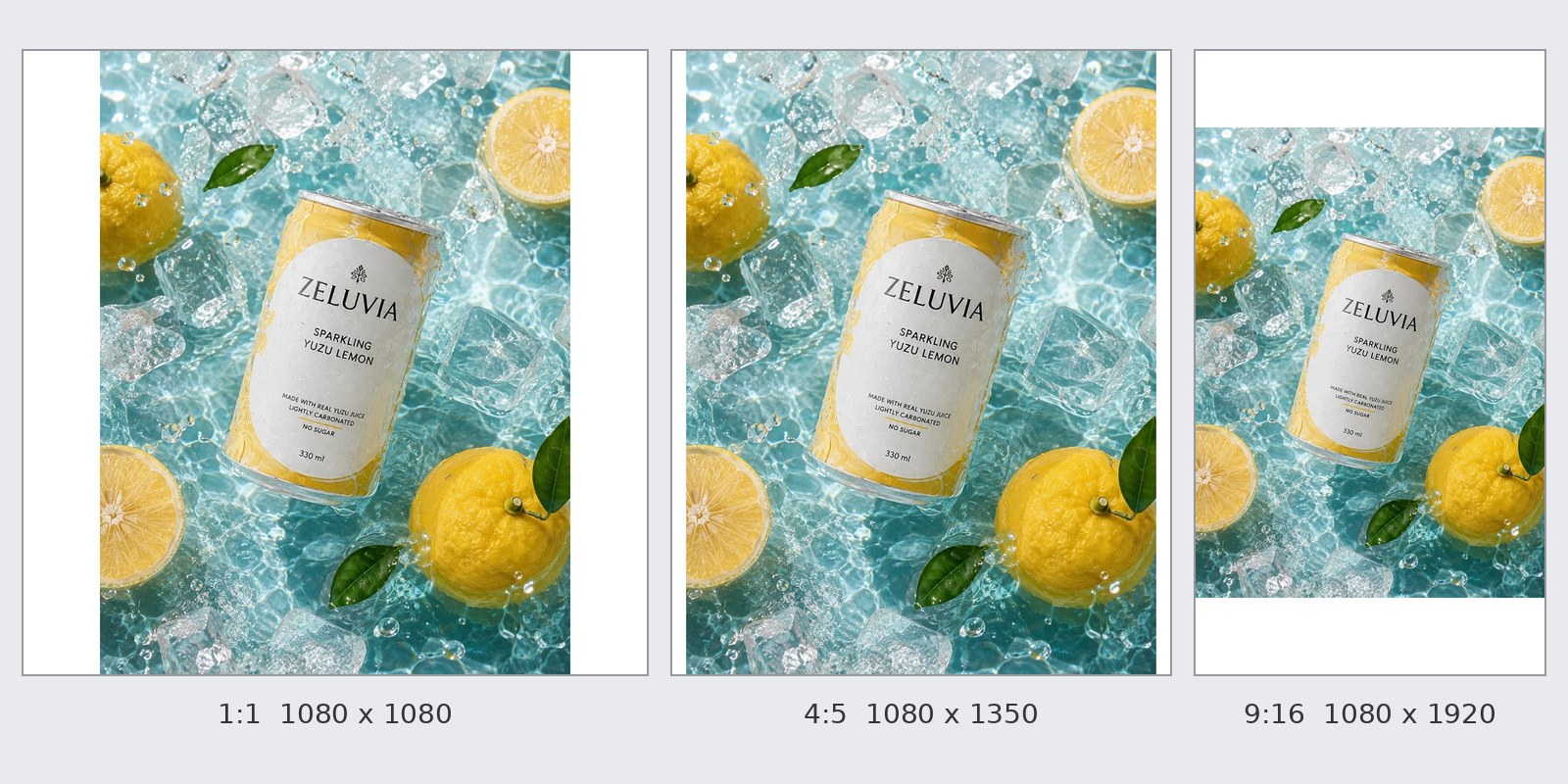
The file type changes the file size a lot. We resized a drink-can photo that is 1086 pixels wide and 1448 high to a 1:1 image of 1080×1080 with the GenLabs image resizer. Same photo, same pixel size, the tool's default (quality 90%): the JPG came out at 293,124 bytes, the WebP at 245,706 bytes, and the PNG at 2,162,269 bytes, which is more than Shopee's 2 MB (tested on 29 September 2026).
If a file is over a platform's limit:
- Save or export it as a JPG first (Shopee and Lazada accept JPG).
- If it is still over, use the image compressor. Pick a target of 100KB, 200KB, 500KB or 1MB. It takes JPG, PNG and WebP up to 10 MB, free 5 times a day. For Shopee, 1MB is under the 2 MB limit. For a LINE rich menu (limit 1 MB), pick 500KB to leave room.
- Read the "new size" number the tool shows before you download, and compare it with the table above.
A detailed PNG may not reach the target you pick. In our test, a 2,677,965-byte PNG with the 100KB target came out at 657,046 bytes. If that happens, convert it to JPG before you compress it.
What file types do Shopee, Lazada and TikTok Shop accept?
Shopee accepts JPEG, JPG and PNG only [3]. Lazada accepts jpg and png [9]. TikTok Shop's product pages do not state the image file type (its storefront page states JPG, JPEG, PNG [16]). If you are not sure, use JPG or PNG.
- A photo taken on an iPhone may be a HEIC file, and WebP is not on the Shopee, Lazada or LINE lists either. Convert it with the image converter: HEIC to JPG, PNG to JPG and WebP to JPG (free 5 times a day, files up to 10 MB, and the tool's page says files are deleted right after processing).
- Facebook and Instagram ads accept many types (BMP, DIB, HEIC, HEIF, IFF, JFIF, JP2, JPE, JPEG, JPG, PNG, PSD, TIF, TIFF, WBMP, WEBP, XBM), but Meta recommends JPG or PNG [25].
- LINE Official Account accepts JPG, JPEG, PNG [36].
- Facebook Page profile and cover images: if they hold a logo or text, Facebook suggests PNG, and the cover that loads fastest is an sRGB JPG [26].
What size are Facebook ad and post images?
A single-image ad in the Facebook Feed is recommended at 4:5 and 1440×1800 pixels, up to 30 MB, as JPG or PNG. 1:1 at 1080×1080 also works [19] [20].
- Feed: at least 600 pixels wide and at least 750 pixels high (at 4:5) [19].
- Stories: 9:16, recommended 1440×2560, at least 500 wide, up to 30 MB [21].
- Reels: 9:16, recommended 1440×2560, at least 600×600, up to 30 MB. Meta recommends no text on the image because the image is small [22].
- Feed carousel: 1:1, at least 1080×1080 pixels, 2 to 10 cards, up to 30 MB per image [23].
- Safe zone in Stories and Reels: leave roughly 14% at the top, 35% at the bottom and 6% on each side free of text, logos and key elements [21] [35].
- The 20% text rule is gone. Meta says there is no longer a limit on the amount of text in an ad image, and the text overlay tool was removed. Text should still not cover the visual [24].
- Page profile picture 320×320 pixels. The cover must be at least 400 wide and 150 high, and loads fastest at 851×315 as an sRGB JPG under 100 KB [26].
- Photo posts on a Page (not ads): Meta does not state a ratio or pixel size on the pages we read (Meta Business Help's aspect ratio page and the Ads Guide cover ads only [19] [41]). Facebook's Help Center recommends JPEG, BMP, PNG, GIF or TIFF files below 15 MB, and a PNG under 1 MB, or it may look pixelated [42]. Through the API, the file must not exceed 10 MB [38].
What size is an Instagram post image?
An Instagram feed photo should be at least 1080 pixels wide, with a ratio between 1.91:1 and 3:4 (at a width of 1080, a height of 566 to 1440 pixels). A photo outside that range is cropped [27].
- Carousel: up to 20 photos and videos in one post, and the shape you choose (square, portrait or landscape) applies to every item [28].
- Reels: a ratio from 1.91:1 to 9:16, a resolution of at least 720 pixels, and a cover of 420×654 pixels (1:1.55) [29].
- Feed ads: 4:5, recommended 1440×1800, at least 500 wide, up to 30 MB, as JPG or PNG, and it accepts ratios from 4:5 to 1.91:1 [30]. Meta's aspect-ratio best-practice page recommends 1:1 for single-image ads in the Instagram Feed [41].
- Stories and Reels ads: 9:16. The Ads Guide recommends 1440×2560. The Stories ad requirements page recommends 1080×1920, with a minimum of 600×1067, image files up to 30 MB, as .jpg or .png [31] [32] [33].
- Carousel ads: 2 to 10 cards, 4:5 for sets of images only (with a video in the set, only 1:1 works) [34].
- The profile grid: the Instagram help pages we read do not state the ratio of the grid thumbnails. A non-official source (Oktopost, page modified 2 September 2026) writes that the grid shows 3:4 thumbnails, which we did not find on Instagram's help pages [R1].
- File size and file type of feed photo posts: the Instagram Help Center pages we read do not state them [27]. Instagram's content publishing docs say the image must be JPEG only (MPO and JPS are not supported) [40], and the file up to 8 MB at a ratio of 4:5 to 1.91:1 and a width of 320 to 1440 pixels [39]. These are the rules for publishing through the API, not for an upload made in the app.
What size are images in a LINE Official Account and LINE SHOPPING?
A LINE rich message (a large image message you send to customers) uses 1040×1040 pixels (square) and up to 10 MB. A rich menu (the image menu in the chat) is up to 1 MB. A profile photo is 640×640 and up to 3 MB. These images take JPG, JPEG or PNG [36].
| Image | Recommended ratio or size | Maximum file size |
|---|---|---|
| Profile photo | 640×640 | 3 MB |
| Cover photo on the profile page (not shown in the LINE app on a PC) | 375×238 | Not stated |
| Rich message | Square 1040×1040; custom width 1040, height 520 to 2080 | 10 MB |
| Rich menu | Large 2500×1686, 1200×810 or 800×540; small 2500×843, 1200×405 or 800×270 | 1 MB |
| Card-based message | Product, location and closing cards 1.54:1; image card 1.11:1; up to 9 content cards and 1 closing card | 10 MB |
| Broadcast image | Not stated | 10 MB |
| LINE VOOM image post | No limit on height or length | 10 MB |
| Coupon | 640×640 | 3 MB |
| Reward card background image | 1920×960 | 10 MB |
LINE SHOPPING: a 1:1 product image, recommended minimum 640×640 pixels, up to 7 images. The official page we read does not state the file size or file types [37]. If you searched for "LINE OA background image", see the rows "Reward card background image", "Cover photo on the profile page" and "Rich menu" above.
You have one product photo: how many sizes do you need?
Three ratios are enough for most rows in the table above: 1:1 for shop product images, 4:5 for Feed posts and ads, and 9:16 for Stories and Reels. What is left is LINE (rich menu, cards) and the 16:9 single image on a TikTok Shop storefront.
We tried a 3:4 photo, 1086 pixels wide and 1448 high (a drink image made with GenLabs), in the free image resizer on 29 September 2026. The same photo gave different results by fit mode:
- 1:1 at 1080×1080, whole photo kept: white borders added left and right, about 135 pixels each.
- 1:1 filled: the photo loses a quarter of its height. The can stays whole because it sits in the middle.
- 1:1 stretched: the can looks short and wide, out of proportion.
- 4:5 at 1080×1350, whole photo kept: closest to 3:4, with very thin white borders, about 34 pixels each side.
- 9:16 at 1080×1920, whole photo kept: white borders of about 240 pixels at the top and the bottom. Filling the frame would lose a quarter of the width.
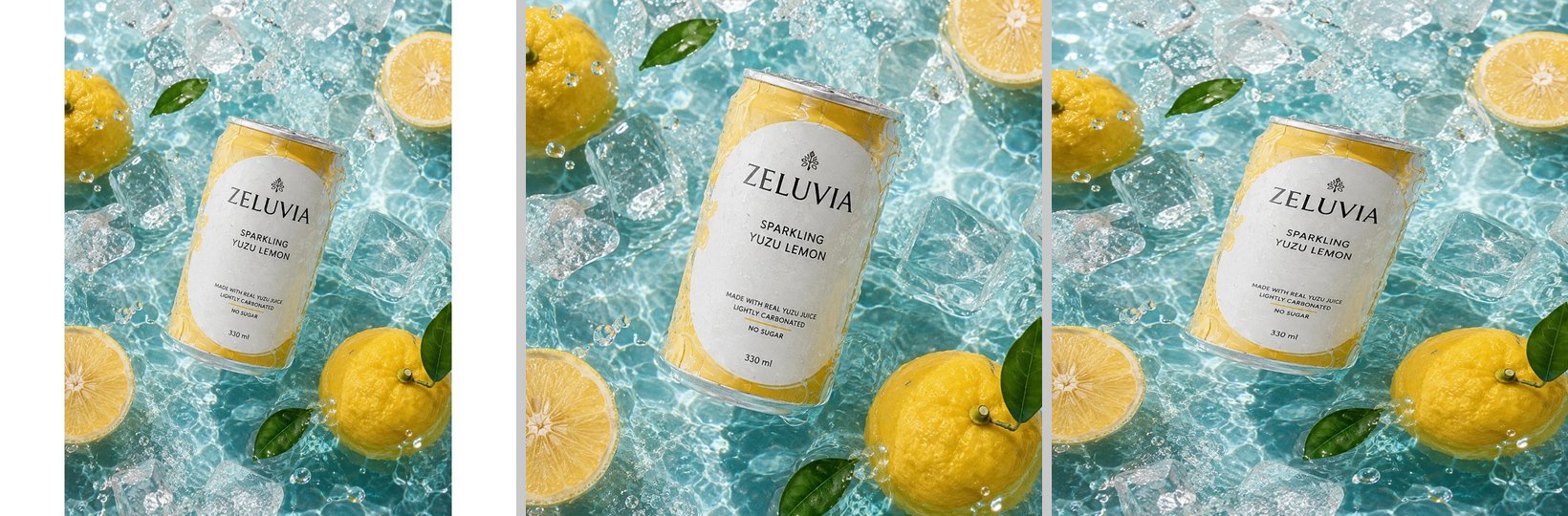
A photo you plan to cut to several ratios should have room around the product. Read how to shoot it in how to take product photos with a phone.
Do it yourself with the free tool:
- Open the image resizer and drop in a JPG, PNG or WebP (up to 10 MB).
- Tick a preset (square 1080×1080, Story/Reels 1080×1920, landscape 1200×628, YouTube 1280×720, Lazada 800×800) or type your own width and height, for example 1080×1350 for 4:5 or 1024×1024.
- Choose the fit: no crop with borders added, fill the frame with an automatic crop, or stretch to fit exactly.
- Choose the file type (JPG, PNG, WebP) and the quality (default 90%), press Resize Image, and download each size.
Limits: the tool sets pixels, not file size in KB (use the compressor next). It resizes one image at a time. It is free 10 times a day, with no sign-up. It runs in your browser, so the file is not uploaded to the cloud, as the tool's page states.
If you have many products, resizing an image to another channel's size in the GenLabs app costs no credits on a paid plan (Startup, Pro, Business). During the free trial, one resize costs 1 trial credit. See what GenLabs can do.
Which numbers do the official pages not give?
The official pages we read on 29 September 2026 do not give numbers for the items below, so we do not guess. Any number can change. If a platform's upload screen disagrees with this article, follow the upload screen.
- Shopee shop banner and decoration images: no number in the text of a current official page (sizes appear in the Seller Centre tool while you upload, or inside images on the pages). An old official Shopee document (created 24 January 2020) states a shop cover of 1080×590 and 5 images of 600×300, for the old shop layout [O1].
- Lazada shop banner, header and logo: no official page found.
- The ratio of ordinary Lazada product images; the file types of TikTok Shop product images; the file size and file types of LINE SHOPPING product images.
- Facebook: the ratio and pixel size of photo posts on a Page (Meta does not state them on the pages we read), and a hard file-size limit for an upload in the app or on the web (the Help Center only recommends below 15 MB [42]; the API sets 10 MB [38]).
- Instagram: the file size and file types of a photo uploaded in the app (only the API numbers exist: 8 MB, JPEG [39] [40]), and the ratio of the profile grid thumbnails (the Instagram help pages we read do not state it; see the Instagram post image section).
Non-official sources (blogs and tool sites, not the platforms' pages) give banner numbers that do not agree, so treat them as background only and use the size your upload screen states:
| Source | Date | Shopee shop banner | Lazada |
|---|---|---|---|
| PigPrep (Shopee) [R2] | Updated 2026-01-15 | 2400×600 (4:1), up to 2 MB | |
| PigPrep (Lazada) [R4] | Updated 2026-06-20 | Main banner 1200×628 | |
| RAiNMaker [R3] | Published 2021-07-15 | Width 1200, height up to 2200 (banner or long image) | Shop header on PC 1200×128, on mobile 750×180, logo 600×600 |
PigPrep's Lazada page also writes a product-image file size and pixel size that contradict Lazada's own pages (5MB and 3000×3000), so we do not use its product-image numbers, and its banner number above should be checked against your upload screen.
Frequently asked questions
How many pixels must a Shopee image be?
At least 500×500 pixels [2]. For images used in ads, Shopee Ads recommends a square of 1024×1024 or more [6]. The ratio is 1:1 or 3:4, the file up to 2 MB, as JPEG, JPG or PNG, and you can upload up to 9 images per product, the cover included [1] [3] [5].
How many pixels must a Lazada image be, and what is the largest file size?
330×330 to 5000×5000 pixels, up to 3 MB, as jpg or png [9] [10]. The official pages we read do not state a ratio for ordinary product images.
What ratio does TikTok Shop use?
1:1, at least 600×600 pixels, up to 10 MB, up to 9 images per product, with 1 picked as the main image [14] [15]. An FAQ answer on the add-products page says "more than 300×300", but the other pages say 600×600. Use 600×600.
What size is a LINE OA background image?
LINE's own page uses "background image" (รูปพื้นหลัง) for the reward card: 1920×960 pixels recommended, up to 10 MB. If you mean the cover photo on the profile page, LINE recommends 375×238 pixels (not shown in the LINE app on a PC). If you mean the rich menu image, the large layout uses 2500×1686, 1200×810 or 800×540, and the small layout uses 2500×843, 1200×405 or 800×270. The file is up to 1 MB, as JPG, JPEG or PNG [36].
Does Facebook still limit the text in an ad image to 20%?
No. Meta says there is no longer a limit on the amount of text in an ad image, and the text overlay tool was removed. Text should still not cover the visual [24]. In Stories and Reels, leave roughly 14% at the top, 35% at the bottom and 6% at the sides free [21].
Can I use one image on every platform?
Yes, if the ratio, pixel size and file size fit every platform's limits. When the ratio does not match, you have to add borders, crop or stretch. The example in this article shows all three. Three ratios, 1:1, 4:5 and 9:16, cover most rows in the table.
Already have your product photo? Resize it to the sizes in this table in your browser. Free 10 times a day, no sign-up.
Resize your photo free, no sign-up
Sources
(all read on 29 September 2026; "no date shown" means the page has none)
Shopee
- Shopee Seller Education: quality product listing criteria, https://seller.shopee.co.th/edu/article/19781 (page dated 23-09-2025)
- Shopee: improving listing quality, https://seller.shopee.co.th/edu/article/14587 (20-06-2022; the same "at least 500x500 pixels" line is at https://seller.shopee.co.th/edu/article/338, dated 07-07-2023)
- Shopee: using the media library, https://seller.shopee.co.th/edu/article/6985 (19-09-2024)
- Shopee: product listing policy, https://seller.shopee.co.th/edu/article/7049 (14-11-2025)
- Shopee: using 3:4 product images, https://seller.shopee.co.th/edu/article/17297 (10-04-2024)
- Shopee Ads Thailand: improve product details for effective ads, https://ads.shopee.co.th/learn/faq/73/59 (no date shown)
- Shopee: new feature, add images to the product description, https://seller.shopee.co.th/edu/article/12631 (12-12-2024)
- Shopee: listing and naming criteria for official stores (Shopee Mall), https://seller.shopee.co.th/edu/article/2215 (25-07-2025; the image rules are inside an image on the page)
Lazada
- Lazada Open Platform: Image Upload, https://open.lazada.com/apps/doc/doc?nodeId=30715&docId=120947 (Last Updated Jul 19, 2024)
- Lazada Seller Center Thailand: How to fix Error message when adding or editing product, https://sellercenter.lazada.co.th/helpcenter/s/faq/knowledge?language=en-US&m_station=BuyerHelp&questionId=1000147829&hybrid=1&flag=tempWebview&categoryId=1000028123 (Last update 2024-11-26)
- Lazada Open Platform: Create a product, https://open.lazada.com/apps/doc/doc?nodeId=30715&docId=120949 (Jul 14, 2026)
- Lazada Seller Center Thailand: Product Score, https://sellercenter.lazada.co.th/helpcenter/s/faq/knowledge?categoryId=1000028119&m_station=faq&questionId=1000147316&language=th-TH (last updated 2024-11-26)
- Lazada Open Platform: Buyer Promotion Image, https://open.lazada.com/apps/announcement/detail?docId=1798 (2023-03-28)
TikTok
- TikTok Shop Seller Academy Thailand: Product Listing Guidelines, https://seller-th.tiktok.com/university/essay?knowledge_id=6837810275518210&default_language=th-TH (16/03/2569 = 2026-03-16)
- TikTok Shop Seller Academy Thailand: Add and manage products, https://seller-th.tiktok.com/university/essay?knowledge_id=6837816604690177&default_language=th-TH (27/08/2569 = 2026-08-27)
- TikTok Shop Seller Academy Thailand: Storefront design, https://seller-th.tiktok.com/university/essay?knowledge_id=10014701&default_language=th-TH (31/03/2569 = 2026-03-31)
- TikTok Ads: Specifications for carousel ads, https://ads.tiktok.com/help/article/specifications-for-carousel-ads?lang=th (last updated September 2026)
- TikTok for Business: Video Advertising Guide for Small Businesses, https://ads.tiktok.com/business/en/guides/video-advertising-guide (no date shown)
Meta (Facebook and Instagram)
- Meta Ads Guide: Facebook Feed image ad, https://www.facebook.com/business/ads-guide/update/image/facebook-feed/link-clicks (no date shown)
- Meta: Recommended minimum image pixel requirements across placements, https://www.facebook.com/business/help/469767027114079 (no date shown)
- Meta Ads Guide: Facebook Stories image ad, https://www.facebook.com/business/ads-guide/update/image/facebook-story (no date shown)
- Meta Ads Guide: Facebook Reels image ad, https://www.facebook.com/business/ads-guide/update/image/facebook-facebook-reels (no date shown)
- Meta Ads Guide: Facebook Feed carousel ad, https://www.facebook.com/business/ads-guide/update/carousel/facebook-feed (no date shown)
- Meta: Best Practices For Image Ads On Facebook And Instagram, https://www.facebook.com/business/help/388369961318508 (no date shown)
- Meta: Supported image formats for ads, https://www.facebook.com/business/help/523719398041952 (no date shown)
- Facebook Help: Page profile picture and cover photo dimensions, https://www.facebook.com/help/125379114252045 (no date shown)
- Instagram Help: Image resolution of photos you share on Instagram, https://help.instagram.com/1631821640426723 (no date shown)
- Instagram Help: Share a post with multiple photos or videos, https://help.instagram.com/269314186824048 (no date shown)
- Instagram Help: Reel size and aspect ratios, https://help.instagram.com/1038071743007909 (no date shown)
- Meta Ads Guide: Instagram Feed image ad, https://www.facebook.com/business/ads-guide/update/image/instagram-feed (no date shown)
- Meta: Design requirements for Instagram Stories ads, https://www.facebook.com/business/help/2222978001316177 (no date shown)
- Meta Ads Guide: Instagram Stories image ad, https://www.facebook.com/business/ads-guide/update/image/instagram-story (no date shown)
- Meta Ads Guide: Instagram Reels image ad, https://www.facebook.com/business/ads-guide/update/image/instagram-reels (no date shown)
- Meta Ads Guide: Instagram Feed carousel ad, https://www.facebook.com/business/ads-guide/update/carousel/instagram-feed (no date shown)
- Meta: About text overlays and the safe zone for ads in Stories and Reels, https://www.facebook.com/business/help/980593475366490 (no date shown)
LINE
- LINE for Business: image and video sizes for LINE Official Account, https://lineforbusiness.com/th/helpcenter/line-oa/manual/mediaspecification (no date shown on the page; the page source carries updated_at 2026-07-30)
- LINE SHOPPING (MyShop): set up a product ready to sell, https://lineshoppingseller.com/knowledge-hub/basic-set-up/product-setup (11 Aug 2024)
Meta, more (the API docs are used only for the numbers of posting or publishing through the API)
- Meta for Developers: Graph API Reference v26.0, Page Photos, https://developers.facebook.com/docs/graph-api/reference/page/photos/ (no date shown; states the file types .jpeg, .bmp, .png, .gif, .tiff, files up to 10 MB, and a PNG kept under 1 MB)
- Meta for Developers: Instagram Graph API, IG User Media, https://developers.facebook.com/docs/instagram-platform/instagram-graph-api/reference/ig-user/media/ (no date shown; API v25.0 reference page; states format JPEG, file size up to 8 MB, ratio 4:5 to 1.91:1, width 320 minimum and 1440 maximum)
- Meta for Developers: Instagram Platform, Content Publishing, https://developers.facebook.com/docs/instagram-platform/content-publishing (no date shown; states that only JPEG images are supported, not MPO or JPS)
- Meta Business Help Center: Best practices for aspect ratios, https://www.facebook.com/business/help/103816146375741 (no date shown; about ad placements in Ads Manager, not Page posts)
- Facebook Help Center: I can't upload photos on Facebook, https://www.facebook.com/help/167931376599294 (no date shown; recommends JPEG, BMP, PNG, GIF or TIFF files below 15 MB, and a PNG under 1 MB)
Not official (used only where labelled as a non-official source)
- R1. Oktopost: Instagram grid size guide, https://www.oktopost.com/blog/instagram-grid-size-guide/ (modified 2026-09-02)
- R2. PigPrep: Shopee product image size 2026, https://pigprep.com/learn/shopee-image-guide (updated 2026-01-15)
- R3. RAiNMaker: picture sizes on e-commerce, https://www.rainmaker.in.th/picture-size-on-e-commerce/ (published 2021-07-15)
- R4. PigPrep: Lazada image sizes, https://pigprep.com/learn/lazada-image-guide (updated 2026-06-20)
- O1. Shopee Seller Education, Ops Onboarding Course (PDF, created 2020-01-24, old shop layout), https://cdngarenanow-a.akamaihd.net/shopee/seller/seller_cms/98e5a5d97b0a272e79be38fb824dc79d/Ops%20Onboarding%20Course%20(1).pdf