Free tool · Image converter
Convert PNG to JPG for free
Pick a PNG, leave the JPG button on (it is the default), press "Convert", then press "Download". It is free, 5 times a day, with no sign-up.
In our test a 1.78 MB PNG became a 211 KB JPG, and a transparent background turned white.
Output format
Drag a file here, or pick from Camera Roll (mobile)
Supports HEIC, JPG, PNG, WebP up to 10MB
How to convert PNG to JPG
- Pick the file: drag a PNG in or choose one up to 10 MB (on a phone, pick from the Camera Roll).
- Leave the JPG button on (it is the default).
- Press "Convert", then press "Download". The file is named converted.jpg.
What changes in the file when you convert PNG to JPG
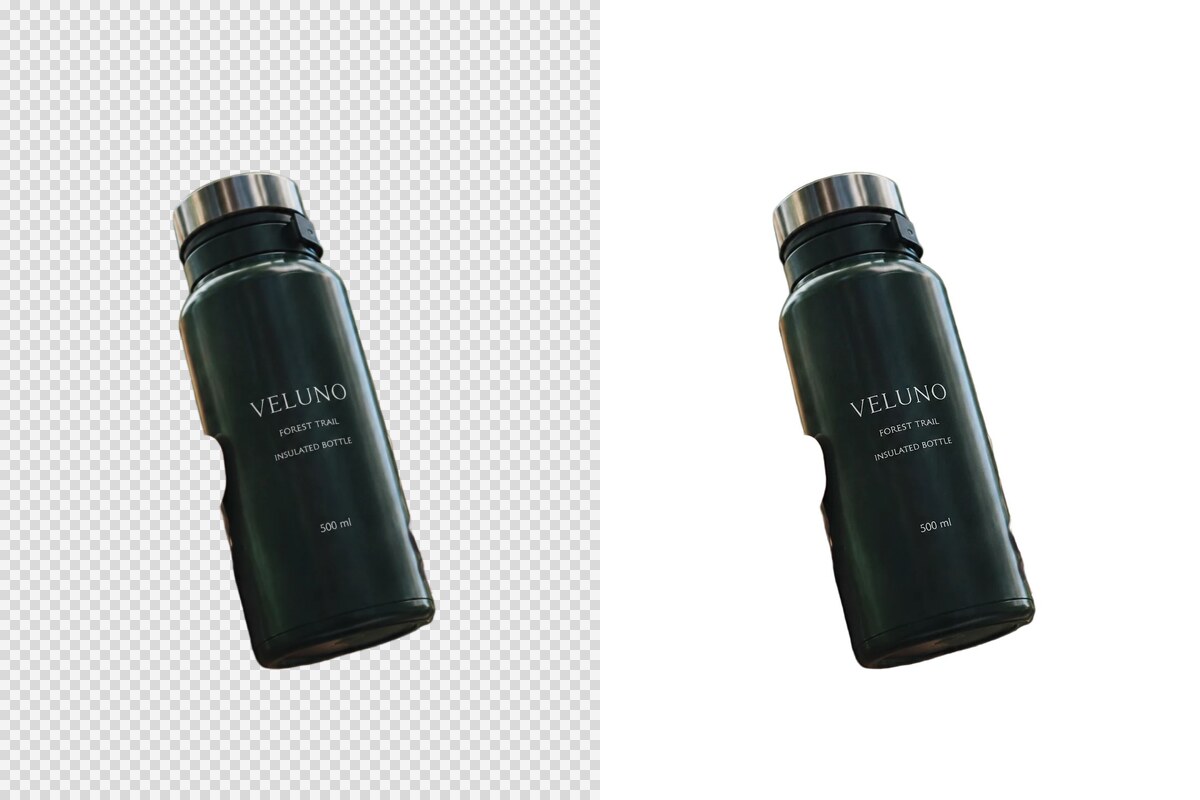
We converted two PNG files (tested 30 September 2026): a picture of a fabric softener pouch made with GenLabs, and a picture of a water bottle with its background removed.
| What | The PNG you put in | The JPG you get |
|---|---|---|
| Fabric softener pouch, file size | 1.78 MB | 211 KB (8.6 times smaller) |
| Fabric softener pouch, pixel size | 1086 × 1448 | 1086 × 1448 |
| Water bottle with background removed, file size | 1.34 MB | 38.9 KB |
| Water bottle with background removed, background | transparent (82.8% of the pixels) | white |
- A transparent background turns white: a JPG cannot be transparent. In the bottle picture all four corner pixels came out white (255, 255, 255). To keep the transparency, do not convert to JPG: keep the PNG, or convert to WebP, which stays transparent (the test is on the image converter page: https://genlabs.in.th/en/tools/image-converter).
- The JPG quality level is about 80 out of 100 and you cannot change it (we measured it from the file we got back), so the picture does not match the PNG pixel for pixel.
- The pixel size stays the same: to change the pixel size, use the image resizer.
- Time: both files came back in about 0.2 to 0.3 seconds (measured from our machine to the server).
What this tool does not do
- It does not choose a background colour: a transparent background always turns white. There is no other colour to pick.
- It has no quality slider: JPG is about 80. For an even smaller file, use the image compressor (https://genlabs.in.th/en/tools/image-compressor).
- It does not take a file over 10 MB, a picture over 50 million pixels (width times height), or a picture with a side longer than 10,000 pixels: a 19.19 MB PNG (3024 × 4032) was stopped by the page before any upload, with the message "This file is too large or can't be opened. Try a JPG, PNG, WebP or HEIC up to 10 MB." A 4032 × 3024 PNG (12.2 million pixels) of 7.67 MB converted and gave a 891 KB JPG.
- It converts one file at a time. The file is uploaded to GenLabs' server to be converted; it is not converted in your browser. GenLabs does not store the result; it goes straight to your browser.
Other conversions
You have your JPG. Next, make the product photo look better.
A JPG is a file type Shopee and Lazada accept, but it is still the photo you took. For product images that look better, send one photo from your phone to GenLabs and pick a direction. A set takes 2 minutes and you write no prompts yourself. See what GenLabs does: https://genlabs.in.th/en/product
Try it on your own product photoFrequently Asked Questions
What colour does a transparent PNG background turn into when I convert it to JPG?
White. A JPG cannot be transparent. In our test a water bottle picture with its background removed came back as a JPG with a white area around the bottle (all four corner pixels were 255, 255, 255). This page has no other colour to pick. To keep the transparency, keep the PNG or convert to WebP instead.
How much smaller does the file get, and does the picture lose quality?
In our test a 1.78 MB PNG became a 211 KB JPG, 8.6 times smaller, with the pixel size unchanged at 1086 × 1448. The JPG compresses the picture at a quality level of about 80 that you cannot change, so it does not match the PNG pixel for pixel. For an even smaller file, use the image compressor: https://genlabs.in.th/en/tools/image-compressor
Do I need to convert a PNG to JPG before I upload it to Shopee or Lazada?
Not if the file is small enough. Shopee states product images as JPEG, JPG or PNG up to 2 MB, and Lazada states jpg and png up to 3 MB (read on 29 September 2026; the sources are in the table on the image converter page: https://genlabs.in.th/en/tools/image-converter). Convert when the PNG is over the limit. Our 1.78 MB test PNG is still under 2 MB, but a PNG made from a 4032 × 3024 pixel test picture (phone-sized, built by our program) came out at 22.18 MB.
My 19 MB PNG says the file is too large. What do I do?
This page stops files over 10 MB before uploading them. In our test a 19.19 MB PNG (3024 × 4032) showed "This file is too large or can't be opened. Try a JPG, PNG, WebP or HEIC up to 10 MB." Make the picture smaller on your own device first (the GenLabs image resizer and image compressor also take files up to 10 MB, so they will not help with this one). A picture over 50 million pixels (width times height), or with a side longer than 10,000 pixels, cannot be converted either. A file within both limits converts, for example a 4032 × 3024 PNG (12.2 million pixels) of 7.67 MB.
More AI Tools You Might Like
Everything you need for your images