Write sales captions with AI, 3 at a time, in GenLabs
In GenLabs, when you schedule a post, there is a “Write caption with AI” button next to the caption box. Tap it and you get 3 sales captions, from the product details of the image you picked or from what you type in the box “What are you selling?”. Pick one and keep editing it. It uses no credits, and it is included in the Startup, Pro and Business plans. The form below shows the free tool’s current availability and daily limit. Our test runs are below.
The product facts in a caption come from the boxes you fill in. In the 9 captions we tried, no number or promotion word appeared that we had not typed. The tool writes 3 things itself: the first line, a closing line that asks the buyer to message or order, and 3 hashtags.
One limit we saw: the first line is a question every time, and the middle lines of all 3 captions are the same, because they are your own text. Rewrite the first line in your shop's voice before you post.
Details
Today 0 / 3
An error occurred. Please try again.
Rewrite the first line in your shop's voice, then post. In GenLabs, next to the caption box when you schedule a post, a "Write caption with AI" button gives 3 captions like these. Pick one, keep editing it, and schedule it to TikTok, Instagram and Facebook from one place.
Start with GenLabsWrite sales captions with AI in the GenLabs app
The caption button is included in the Startup, Pro and Business plans and uses no credits
View pricing Sign Up FreeReal examples: what we typed and what came back
We ran this tool 3 times on 30 September 2026. Below are 2 of those runs (the third, the buns typed in Thai, is on the Thai page), with products from the sample work on the GenLabs website. The captions you see are exactly what the tool answered, character for character; we changed nothing. Both pictures are on the GenLabs website, made with GenLabs, and are not tied to a shop or a product on sale.
Example 1 · Salted egg custard buns, Instagram, typed in English on this page
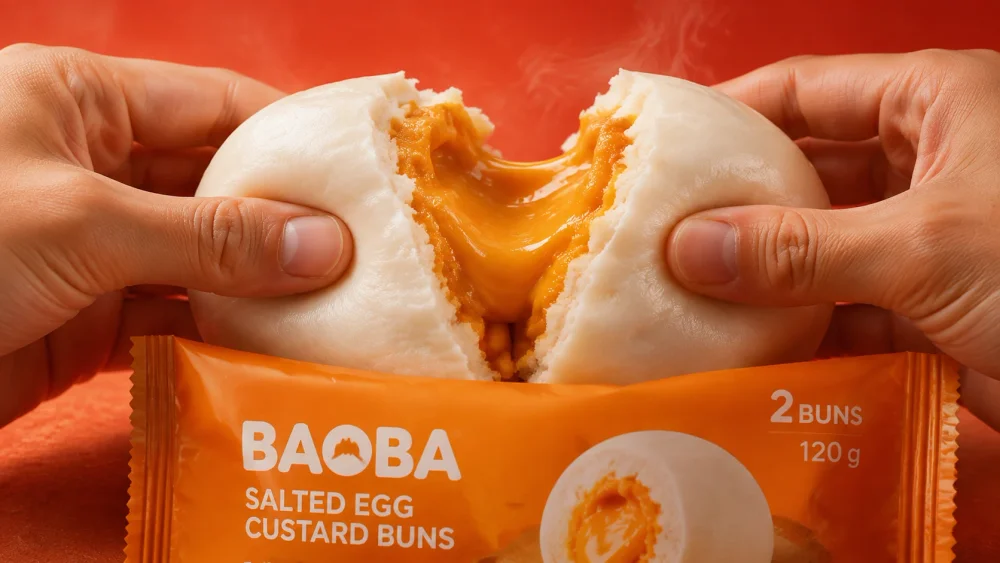
| Box | What we typed |
|---|---|
| Product name | Salted egg custard buns |
| Details | Pack of 2 buns, 120 g. Eat them hot. When you pull a bun apart, the salted egg custard filling runs out. |
| Price | left empty |
| Platform |
The 3 captions we got (in 1.5 seconds):
Do you want to try these salted egg custard buns?
Salted egg custard buns
Pack of 2 buns, 120 g. Eat them hot. When you pull a bun apart, the salted egg custard filling runs out.
Message us to order your pack.
#saltedeggcustardbuns #buns #saltedegg
Have you seen how the salted egg custard filling runs out of these buns?
Salted egg custard buns
Pack of 2 buns, 120 g. Eat them hot. When you pull a bun apart, the salted egg custard filling runs out.
Ask us about ordering these buns.
#saltedeggcustardbuns #custardbuns #saltedegg
Are you looking for a pack of 2 salted egg custard buns?
Salted egg custard buns
Pack of 2 buns, 120 g. Eat them hot. When you pull a bun apart, the salted egg custard filling runs out.
Send a message to order.
#saltedeggcustardbuns #buns #custard
Example 2 · Canvas tote bag, Instagram, typed in Thai (the same tool answers in Thai when you type Thai)
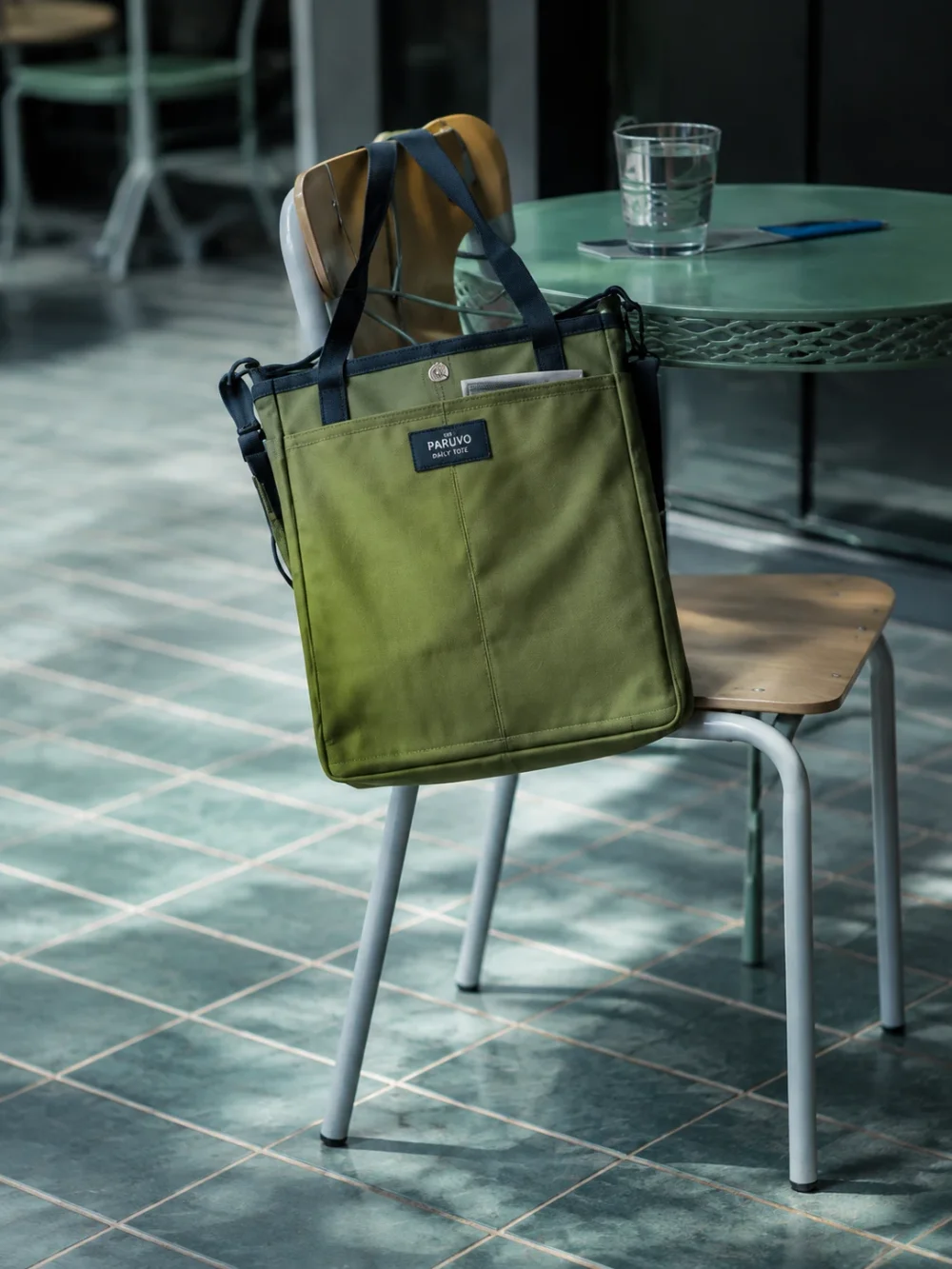
| Box | What we typed (Thai) | Reading in English |
|---|---|---|
| Product name | กระเป๋าผ้าแคนวาส | Canvas bag |
| Details | ทรงโท้ต สีเขียวมะกอก หูหิ้วสีเข้ม แขวนกับพนักเก้าอี้ได้ | Tote shape, olive green, dark handles, can hang from a chair back |
| Price | left empty | |
| Platform |
In every caption the two middle lines are the product name and the details exactly as typed, so the table shows only the lines the tool wrote: the first line and the closing line. The 3 hashtags were the same in all three: #กระเป๋าผ้าแคนวาส #ทรงโท้ต #สีเขียวมะกอก (the product name, then two pieces of the details we typed). The tool answered in 1.8 seconds.
| Caption | First line (Thai) | Reading | Closing line (Thai) | Reading |
|---|---|---|---|---|
| 1 | กระเป๋าผ้าแคนวาสทรงโท้ตสีเขียวมะกอกใบนี้แขวนกับพนักเก้าอี้ได้ใช่ไหม | Can this olive-green tote-style canvas bag hang from a chair back, right? | สนใจสอบถามข้อมูลเพิ่มเติมได้เลย | Feel free to ask for more information |
| 2 | หูหิ้วของกระเป๋าผ้าแคนวาสสีเขียวมะกอกเป็นสีเข้มใช่หรือไม่ | Are the handles of this olive-green canvas bag a dark colour? | สั่งซื้อหรือสอบถามได้ที่นี่ | Order or ask here |
| 3 | กระเป๋าผ้าแคนวาสทรงโท้ตสีเขียวมะกอกมีหูหิ้วสีเข้มใช่ไหม | Does this olive-green tote-style canvas bag have dark handles? | สอบถามรายละเอียดเพิ่มเติมได้เลย | Feel free to ask for more details |
Neither example had a price, so no caption has one. What each line is and where it comes from is in section 2.
One caption has 5 lines: which you typed and which the tool wrote
All 9 captions we tried have the same shape: 5 lines. This table shows where each line comes from.
| Line | Who wrote it | What we saw in 9 of 9 captions |
|---|---|---|
| First | The tool | A question about the product. In 8 of the 9 it asks about something picked from your details, such as the weight of the pack, the handles, or hanging from a chair; in the other it asks about the product name |
| Second | You | The product name as typed |
| Third | You | The text in the details box, as typed, character for character |
| Closing | The tool | A line that asks the buyer to message, ask or order, such as "Message us to order your pack." |
| Last | The tool | 3 hashtags; the first is the product name run together, the other two are pieces of the name and details you typed |
In all three runs the price box was empty, so there is no price line. We have not typed a price ourselves; when you type one, check that the price in the caption matches before you post.
The 3 captions in one run differ in the first line and the closing line. The second and third lines are the same in all three. The hashtags were the same in all 3 captions in both Thai runs and differed a little in the English run.
The source test: every number and feature must trace back to a box you filled in
The source test is a read of the caption, line by line, before you post. Every number and every feature must be found in a box you filled in, or on your label and product page. If you cannot find it, delete that line.
The tool passed this test in the runs we tried. We compared the numbers in all 9 captions with what we typed, by script. The count of numbers we had not typed was 0 (the numbers you see are 2 and 120, both typed by us), and no discount or promotion word was added.
The reason is that the tool places the text of your details box into the caption as you typed it. If you type the true facts of your product, the facts in the caption are the true facts of your product. Read the 3 things the tool writes itself (the first line, the closing line and the hashtags) with the same test.
Use it in GenLabs in 3 steps
It works in the GenLabs app in a browser, on a computer or a phone, with nothing to install. The button sits where you schedule a post, which is included in the Startup, Pro and Business plans.
- Pick the image you will post. When you schedule a post in GenLabs, pick the image. If it was made from a product you saved, the button uses that product's details.
- Tap “Write caption with AI”. If there are no product details yet, type them in the box “What are you selling?”, such as “hair serum, 30 ml bottle, 390 baht”. Type what your label or product page says, so the caption talks about your product.
- Pick 1 of the 3, rewrite the first line, and schedule. The one you pick goes into the caption box, where you can keep editing, and you schedule it to TikTok, Instagram or Facebook from one place. The button uses no credits.
Does the platform you pick change the caption?
We cannot say yet, because we have not sent the same details to two platforms. The three runs picked Instagram, TikTok and Instagram, and all three had the same shape: 5 lines, a question first, a closing line that asks the buyer to message or order, and 3 hashtags.
Pick the platform you will post on, then adjust the length and the hashtags for it yourself. Where the caption shows on Facebook, Instagram and TikTok is in the Scene-Item-Message formula and 15 example captions under images.
The limits we found
In the runs we tried, this tool gave a draft that added no facts of its own, but it is not yet a caption you can post as it stands.
- The first line is a question in 9 of 9 captions, and some read stiffly. For example, "ซาลาเปาไส้ครีมไข่เค็มแพ็กสองลูกมีลักษณะอย่างไร" (in Thai; it asks "What is the two-bun pack of salted egg custard buns like?") reads more like a form question than a seller talking. Several ask again what you just typed, such as "กระเป๋าผ้าแคนวาสทรงโท้ตสีเขียวมะกอกมีหูหิ้วสีเข้มใช่ไหม" (it asks "Does this olive-green tote-style canvas bag have dark handles?"). You can rewrite it from the words you typed, such as "ฉีกตอนร้อนๆ แล้วไส้ครีมไข่เค็มไหลเยิ้ม" ("Tear it open hot and the salted egg custard runs out"), which still passes the source test because every word comes from the details we typed. In English the first lines were questions too: "Do you want to try these salted egg custard buns?"
- The 3 captions differ in the first line and the closing line. The middle is the same because it is your text. To get a different middle, type different details each time.
- The hashtags are pieces of the words you typed, such as #ทรงโท้ต and #สีเขียวมะกอก (tote shape, olive green). Check that they are words buyers search.
- You cannot pick a tone (funny, punchy, soft sell). The form has 4 boxes: product name, details, price and platform. The tone is yours to edit.
- Text only. It does not read a product photo.
- Free use is subject to the quota shown in the form. The same caption writer is in GenLabs where you schedule a post, which is included in the Startup, Pro and Business plans.
- We have not measured sales. We do not know which caption gets more orders, so we give no sales figure.
- 3 runs, 2 products, on 30 September 2026: 2 runs in Thai and 1 in English. We have not typed a price.
After the caption: write it when you schedule the post in GenLabs
GenLabs uses the same caption writer as this tool. Next to the caption box, when you schedule a post, there is a "Write caption with AI" button. Press it and you get 3 captions; pick the one you like and it goes into the caption box, where you can keep editing. The button uses no credits, and you can schedule the post to TikTok, Instagram and Facebook from one place.
700+ Thai businesses have paid for GenLabs.
Start with GenLabsRelated guides
Frequently asked questions
Do I need to sign up to write sales captions with AI?
The free form on this page needs no sign-up when available; check its status and daily limit above. The “Write caption with AI” button sits next to the caption box when you schedule a post in GenLabs. It uses no credits and is included in the Startup, Pro and Business plans, from ฿599 a month. See all plans at https://genlabs.in.th/en/pricing
Will the tool add a price, a discount or a feature I did not type?
Not in the runs we tried. In 9 captions there was no number we had not typed, and no discount or promotion word. The price box was empty in every run, so no caption had a price; we have not typed a price ourselves. The tool places the text of your details box into the caption as you typed it, so type only what your label or product page says, and read every line before you post, using the source test on this page.
Can it write captions in Thai as well as English?
Yes. When we tried the free tool on this page, English in gave 3 English captions, such as "Do you want to try these salted egg custard buns?" On the Thai page, our 2 Thai runs gave Thai captions with no English letters in them. The “Write caption with AI” button in GenLabs uses the same caption writer.
Can I upload a product photo and get a caption written from the picture?
No. The caption writer takes text only and does not read pictures. In GenLabs, the caption button uses the product details saved with the image you picked. If there are none, type them in the box “What are you selling?”. To write a caption that fits the picture, see the Scene-Item-Message formula and the swap test at https://genlabs.in.th/en/blog/sales-captions
Can I post the caption as it comes?
Use it as a first draft. Rewrite the first line in your shop’s voice, because the first line is a question every time and some read stiffly. Then read every line with the source test and post. How to write a first line that fits the picture is at https://genlabs.in.th/en/blog/sales-captions
Does GenLabs write the caption when I schedule a post, and does it use credits?
Yes. Next to the caption box when you schedule a post in GenLabs, a "Write caption with AI" button uses the same caption writer as this tool, gives 3 captions, lets you edit the one you pick, and uses no credits. Social publishing is part of every plan. The Startup plan (฿599 a month) connects 1 social account. The Pro (฿1,990) and Business (฿4,990) plans connect unlimited accounts. See https://genlabs.in.th/en/pricing
By Sway, CEO & Founder of GenLabs · tool tested on 30 September 2026